





%20(Presentation)%20(1600%20x%20600%20px)(510)-a7a84a4b-0b0a-4b70-ac83-98e61e79151e.webp&w=3840&q=75)
Consumer Electronics
•04 min read

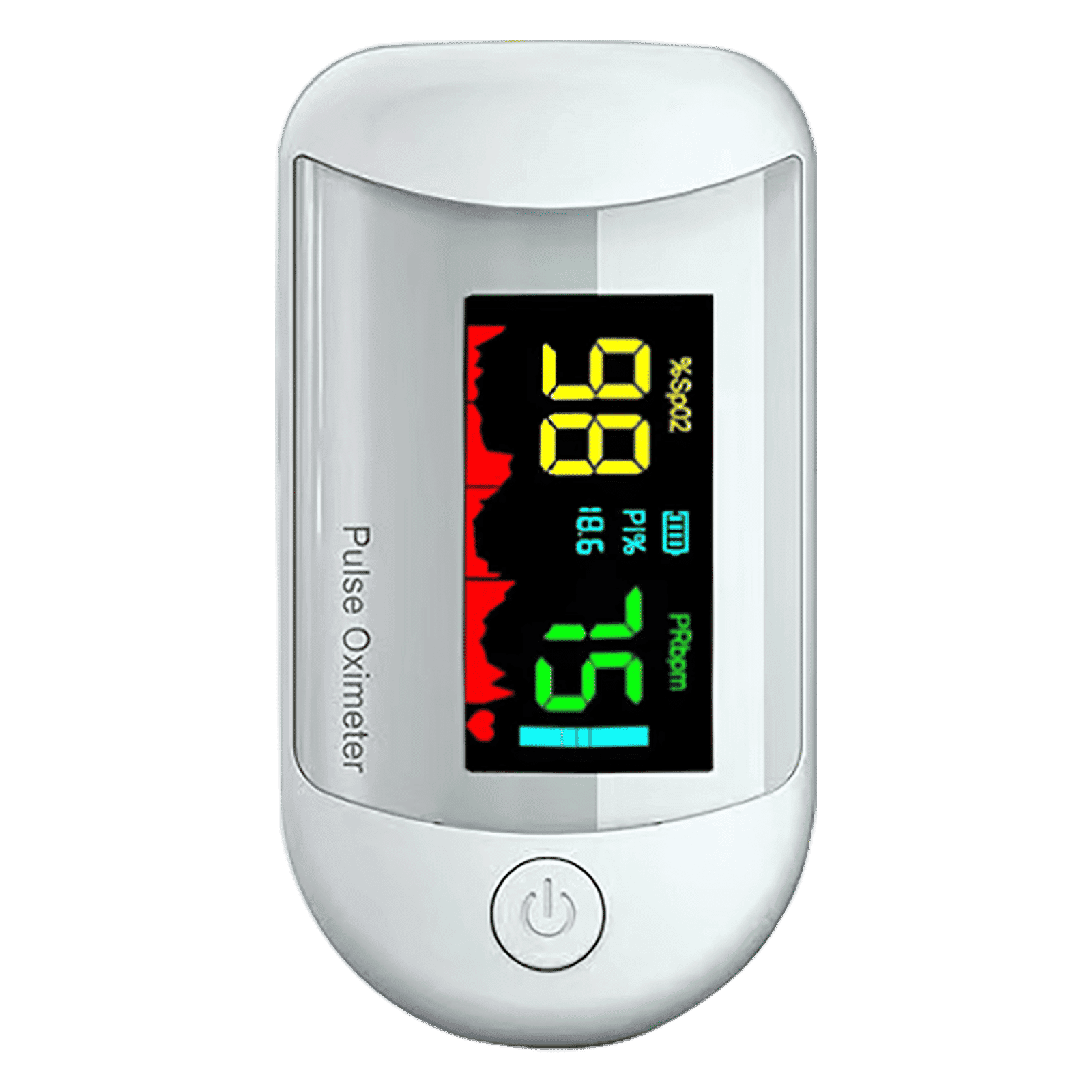
<p><strong>Why buy iGear Health Digital Pulse Monitor/Oximeter</strong></p> <p> </p> <ul> <li><strong>Fast, Reliable Measurement</strong> of Oxygen Saturation (SpO2) and Pulse (PR bpm) within 5-8 seconds</li> <li><strong>Perfusion Index</strong> of 0.3% measures even the weakest of the Pulse</li> <li><strong>Auto Power Off</strong> when not in use</li> <li><strong>4 Direction Display</strong> and Multi-coloured Display for ease of reading</li> <li><strong>Infrared Sensor</strong> for seamless operation</li> </ul> <p> </p> <p>Stay healthy and fit by keeping a regular check of your oxygen level by bringing home the <strong>iGear Health Digital Pulse Monitor/Oximeter</strong>. Although, the Blood pressure monitor may be the most recognizable medical tool in the market, but Pulse Oximeter is a close second for the most-used medical device. Being fast and reliable, the <strong>iGear Health Digital Pulse Monitor/Oximeter</strong> measures the amount of oxygenated blood (Spo2) in your body, giving medical professionals an idea of how much oxygen your body is carrying to vital organs and tissues. It measures Oxygen Saturation (SpO2) and Pulse (PR bpm) within 5-8 seconds. It comes with a measuring range of 0 – 100% (Oxygen Saturation) and 25 – 250 bpm (Pulse Rate). It has accuracy in readings of Oxygen Concentration in the Blood range 0-100% (+/- 2%) and Pulse rate range 25-250 bpm (+/- 2 bpm). It comes with a Perfusion Index of 0.3%, which can measure even the weakest of the Pulse.</p> <p> </p> <p>Having the <strong>iGear Health Digital Pulse Monitor/Oximeter</strong> at home allows the patients to monitor vital signs with an extra layer. These tools give you a better view of your health and allow you to coordinate with your healthcare provider. If you have a condition that affects your blood oxygen levels -think sleep apnea, chronic obstructive pulmonary disease (COPD), asthma, lung cancer, or heart failure, among many other conditions you may benefit from an at-home Pulse Oximeter. It comes with Infrared Sensor that seamlessly records all the readings. The One-click measurement of the device makes it convenient to operate. Viewing the readings will no longer be a struggle. Thanks to the 4 direction display and multi-colored display that makes viewing the reading simple and easy. Being battery operated, it offers long-lasting usage having an auto power-off feature. So, wait no more! Order the <strong>iGear Health Digital Pulse Monitor/Oximeter</strong> online, right away!</p>

Imagine this scenario: You’re in the middle of an important call or enjoying your favourite show, and suddenly your phone shuts off without any warning. This unexpected shutdown can disrupt your day and leave you puzzled. Many wonder, why is my phone switching off on its own? Here, we dive deep into the common reasons behind this frustrating issue and offer practical steps to help you confidently address the problem.
One of the most frequent culprits is the battery. A degraded battery or improper charging habits can lead to power problems. If your phone is draining rapidly or struggles to hold a charge, it may be a sign of battery degradation. In such cases, the device might choose to shut itself down unexpectedly to prevent further damage.
Another common reason is overheating. Prolonged usage, operating your device in direct sunlight, or even internal hardware faults can cause your phone to heat up. As a protective measure, many smartphones automatically power off when they reach a critical temperature. Keeping your phone cool is essential to ensure it operates smoothly, especially if you often use resource-demanding apps or games.
Outdated software or problematic applications can also create challenges. When the operating system or apps encounter bugs or corrupted files, they might trigger an automatic shutdown. Regularly updating your phone’s software and keeping a check on app performance can reduce the risk of random shutdowns, ensuring the system operates efficiently.
Physical damage, exposure to moisture, or other hardware issues might be responsible if your phone suddenly powers off. Even minor accidents, such as a drop or water spill, can lead to internal damage that affects the power delivery. Identifying these hardware issues early might save your device from prolonged disruptions.
Start by examining your battery’s status. For both iPhone and Android devices, there are built-in status checks that can indicate battery performance. If the battery’s efficiency has declined, consider getting it replaced. A healthy battery is essential to maintain a reliable power supply and ensure your phone doesn’t unexpectedly shut down.

<p>Danger can overpower you at any time and your voice will not be enough in such situations to get the required aid. The amazing new <strong>Juvo PSB01 Personal Alarm</strong> is crafted for all ages and is a necessary precaution from all kinds of danger. It rings a very loud alarm at 120 dB as well as flashes the torch to warn people nearby about a danger. Whether you have a medical emergency or you are attacked by predators your voice may not be heard but this alarm will be enough to deter attackers or draw attention of people close by to give you the immediate assistance required.</p> <p><strong>Extremely Easy To Use</strong></p> <p>The <strong>Juvo PSB01 Personal Alarm</strong> is small and portable, can be attacked to even a keychain if you want. To start the siren all you need to do is separate or pull the metal key chain from the main black unit. The siren may go on for 1 1/2 hours in case nobody heard it in the first minutes. This is very important for girls returning home alone at night as it acts as a security anti-attack panic alarm that is sure to scare off a molester. Its easy portability accentuates its use.</p> <p><strong>Lights Your Way</strong></p> <p>The little and portable <strong>Juvo PSB01 Personal Alarm</strong> also features a small LED torch that helps you find your way in the dark. Don’t be scared of dark alleys when you have this with you because it is equipped to save you from all dangers.</p>
Managing your phone’s temperature can prevent shutdowns caused by overheating. Avoid placing your device in direct sunlight or leaving it in hot environments. Removing bulky cases during intensive tasks may also help. If the phone feels excessively warm, allow it to cool down before resuming use.
Outdated software is a common cause of system instability. Regularly check for operating system updates and install them as soon as they are available. Updating your apps is equally important to fix any potential software bugs. These updates often include improvements that resolve known issues, ensuring smoother performance.
Booting your phone into Safe Mode can help identify problematic apps that may be causing the issue. In Safe Mode, only the essential system apps are active. If the phone runs correctly in this mode, it may indicate that a recently installed app is the culprit. Once identified, you can remove or update the problematic app to prevent further issues.
If you’ve tried other fixes and your phone continues to power off unexpectedly, performing a factory reset might be necessary. This step restores your device to its original settings, eliminating any software glitches that may have developed over time. Always remember to back up your important data before resetting.
Improving your charging habits can extend your battery’s life significantly. Using the charger that came with your device and avoiding overcharging can maintain the battery’s health. This proactive approach not only reduces the chances of unexpected shutdowns but also ensures that your phone remains operational for longer periods.
Installing too many apps or overloading your device with background processes can strain its resources. Regularly managing your storage and clearing unused apps can help maintain optimal performance. Reducing unnecessary load on your device keeps both the hardware and software components running efficiently.
Simple maintenance tasks, such as cleaning the charging port and updating your software, can make a significant difference. Over time, dust and debris can accumulate in port areas, affecting charging and connectivity. Periodic cleaning ensures that your phone performs at its best and decreases the likelihood of technical issues.

<p><strong>Why buy Environics Enviroglobe Anti Radiation Ball for House & Car</strong></p> <p> </p> <ul> <li><strong>Provides E-Smog and Radiation Protection</strong> for healthier homes and families</li> <li><strong>It Covers A Radius</strong> of 250 sq.ft protect you and your loved ones from harmful radiation</li> <li><strong>Clinically Tested EMF Harmonizer</strong> that provides us 360-degree protection from radiation sources that are beyond our control</li> </ul> <p> </p> <p>Buy the <strong>Environics Enviroglobe Anti Radiation Ball for House & Car</strong> which is based on Envirochip’s radiation protection technology that helps you protect you and your loved ones from harmful radiation within an area of 250 sq. feet. You can extend the range of protection by placing multiple Enviroglobes at equal distances from one another. It is a clinically tested EMF harmonizer and provides us 360-degree protection from radiation sources that are beyond our control. Electromagnetic Radiation (EMR) refers to the constant waves of the electromagnetic field (EMF) produced by wireless communication devices such as mobile phones, laptops, Wi-Fi routers, and other sources such as mobile towers and high-tension wirelines, etc. However, The human body is accustomed to random waves and hence the constant exposure to electromagnetic radiation causes serious biological disorders such as higher stress and fatigue, irritation, headache, weakened immunity, cancer, fertility issues to name a few. The technology used in Enviroglobe changes the nature of electromagnetic radiation from constant to random waveform making it human body-friendly.</p> <p> </p> <p>When you get <strong>Environics Enviroglobe Anti Radiation Ball for House & Car</strong> online, you also get awesome companion for your home. It comes with Internationally tested and certified technology. No need of batteries or adaptors, you can simply charge by placing it under the sunlight, for only a couple of minutes every week. Enviroglobe is simple to use. Simply place it at your desk, table, living room, bedroom, car, office space, absolutely wherever you want, and get a radiation protected zone of up to 250 sq. feet. It provides e-smog and radiation protection for healthier homes and families. Purchase <strong>Environics Enviroglobe Anti Radiation Ball for House & Car</strong> online, now!</p>
Expert Tip: The Overheating Connection
Did you know? Overheating is one of the most common reasons for automatic phone shutdowns. High temperatures can damage internal components and force your phone to power off as a safety measure. Always keep your phone in a cool, ventilated area during heavy use.
Start by checking your battery health and addressing overheating concerns. Next, update your software and uninstall any problematic apps. If the issue continues, a factory reset or professional assistance might be necessary.
Your phone might have shut down unexpectedly due to overheating, a degraded battery, or software glitches. Identifying the root cause through troubleshooting steps is crucial to resolving the issue.
Frequent restarts often occur due to corrupted apps or malware. Booting your phone into Safe Mode can help isolate the problematic app or software build.
A black screen might indicate a hardware malfunction, like a damaged display or loose connections. It could also be a software crash. Restarting your device or a factory reset may be required to fix the problem.
This scenario might seem puzzling, but factors like overheating, a faulty power button, or underlying software issues can cause it. Carefully inspect your device for any signs of physical damage or software bugs.
Unexpected phone shutdowns can certainly be annoying, yet understanding the underlying factors can empower you to take corrective actions. Whether it’s a battery that no longer holds a charge, overheating from extended use, or software quirks, being aware of these issues is the first step to resolving them. Regular maintenance, timely updates, and careful attention to your device’s operating conditions can go a long way in ensuring that your phone continues to function reliably.
At Tata Neu, we understand that a seamless and dependable digital experience matters. Our platform champions ease of use and rewards like NeuCoins, making smart shopping both convenient and rewarding. With offers such as earning up to 5% NeuCoins every time you shop, whether online or in-store at Croma outlets, you not only invest in your digital lifestyle but also enjoy special benefits that assist you in making the most of every purchase. By managing your tech in a proactive manner and embracing routine care, you pave the way for a more reliable and enjoyable smartphone experience.
This blog has guided you on common reasons for unexpected shutdowns and provided practical steps to keep your device running smoothly. From checking battery health to maintaining proper temperature control, every tip is designed to ensure a steady and secure operation of your mobile device. Stay informed about your tech, and allow Tata Neu to inspire smart, confident choices in every purchase.
