





%20(Presentation)%20(1600%20x%20600%20px)(511)-e778314e-9d9f-46d4-b4bf-0cbc2bb57eac.webp&w=3840&q=75)
Consumer Electronics
•03 min read


<p><b>HEUV Technology</b><br/><br/>Thanks to the HEUV technology, the SVARAS Home X2 Pro UV Steriliser effectively targets and eliminates a wide range of viruses and bacteria, including those responsible for illnesses such as the coronavirus. As a result, you can have peace of mind knowing that you can effectively protect yourself and your family from potential health threats.<br/><br/><br/><b>Enhanced Sterilisation</b><br/><br/>This rechargeable UV steriliser provides optimal sterilisation capabilities, which eliminates harmful germs. This high level of effectiveness makes it an ideal choice for homes, offices, and shops, ensuring that surfaces remain clean and safe. Thus, you can trust this steriliser to protect your health and the health of your loved ones by efficiently disinfecting various surfaces.<br/><br/><br/><b>User-Friendly Functionality</b><br/><br/>This home steriliser boasts convenient features that enhance its usability. It includes a voice alarm that signals when the sterilisation process is complete, ensuring you never forget to turn it off. Additionally, the device offers a safe automatic power-off feature, which enhances safety during operation. Convenient charging capabilities further simplify the user experience, which makes it easy to keep the steriliser ready for action.<br/><br/><br/><b>Eco-Friendly Design</b><br/><br/>Designed with sustainability in mind, this SVARAS steriliser promotes an eco-friendly lifestyle. It operates without mercury or harsh chemicals, which makes it safe for both users and the environment. This design choice allows you to maintain a clean living space while reducing your ecological footprint. Moreover, the sleek, modern appearance of the steriliser ensures that it complements any decor.</p>

Imagine this: you’re in the middle of an important call or task, and without any warning, your phone switches off. It can be both frustrating and inconvenient when your mobile suddenly powers down. This guide explores the common reasons why my phone switch off automatically and provides practical solutions to help you troubleshoot and resolve the issue, ensuring that your device remains reliable when you need it most.
Unexpected phone shutdowns occur for a variety of reasons and are not limited to any specific brand or model. Whether it’s a situation where the device powers off even with what appears to be a full charge or it shuts down during resource-intensive tasks like gaming or video streaming, identifying the root cause is the first step toward a solution. Noticing symptoms like difficulty in rebooting after an abrupt shutdown can be a clear indicator that a more detailed investigation is needed.
You might find that your mobile keeps turning off even when the battery indicator shows ample charge. Sometimes, the shutdown problem is specific to particular tasks, such as using certain apps that may trigger a failure, or maybe the phone simply refuses to restart without a manual intervention.
The battery is at the heart of your phone’s functionality. If it is degraded or faulty, it can trigger unexpected shutdowns. A failing battery might also exhibit additional signs such as rapid draining or visible swelling. These issues can manifest even if you mostly see the charging indicator correctly.
Many devices are designed with safety features that automatically power off the phone to prevent damage during high-temperature conditions. Extended use, exposure to direct sunlight, or running intensive applications without proper ventilation can intensify this issue.
Another common reason why my phone switch off automatically could be related to software glitches. Corrupted updates, bugs, or rogue apps that consume excess resources can cause the device to crash unexpectedly. Keeping the software current and ensuring that all apps are updated can help mitigate these issues.
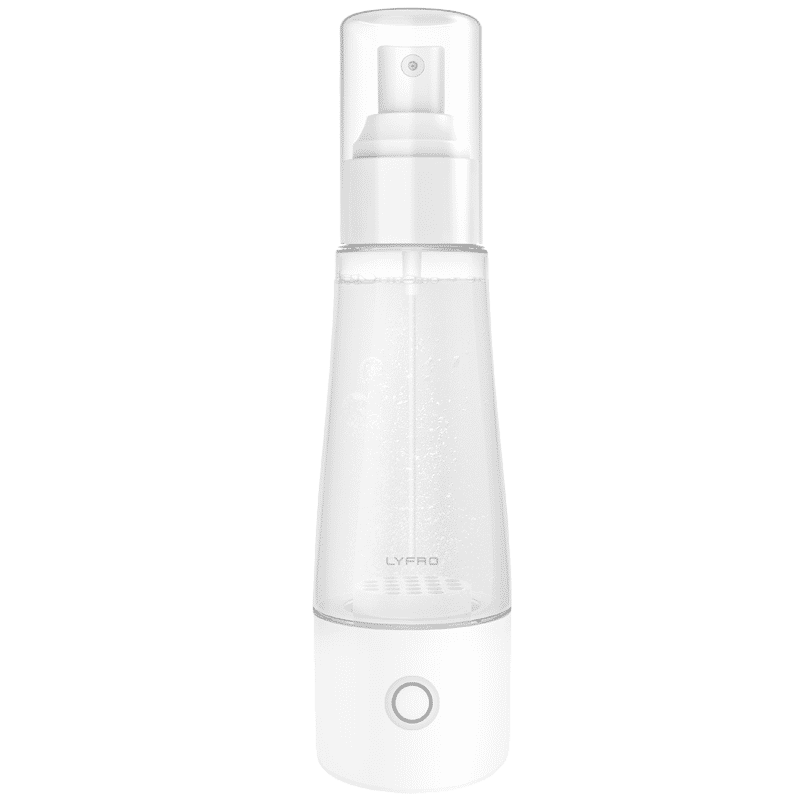
<p>The <strong>Lyfro Battery Powered Disinfectant Solution Generator</strong> is non-toxic and has no side effects</p> <ul> <li><strong>Free of Chemical Residues</strong> makes it an eco-friendly, cost-effective disinfectant</li> <li><strong>Uses Electrolysis</strong> to produce natural powerful disinfectant</li> <li><strong>300 mAh Battery</strong> with USB recharging facility</li> </ul> <p>Buy <strong>Lyfro Battery Powered Disinfectant Solution Generator</strong> to experience its awesome usages. It is an ultra-portable non-toxic disinfectant maker. It comes with an electrolysed water generator. Useful to sterilize public places as well. Use <strong>Lyfro Battery Powered Disinfectant Solution Generator</strong> which allows you to create your own non-toxic disinfectant in just 3 minutes. Simply add salt and water together. Uses electrolysis to produce natural powerful disinfectants proven to be effective against bacteria, viruses, and mold.</p> <p>When you get <strong>Lyfro Battery Powered Disinfectant Solution Generator</strong> online, you also get an awesome eco-friendly, cost-effective disinfectant for your everyday life. It is equipped with a 300 mAh battery with USB recharging facility. It is usable at home, office, or in transit. It eliminates up to 99.9 percent pathogens. It is free of chemical residues. It is a self-made disinfectant.</p>
Loose internal connections or damaged hardware components, such as a sticky power button or outdated circuitry, might be the culpable factors behind your device’s random shutdowns. If you suspect physical damage, it may be wise to have the device examined by a professional technician.
Check the Battery Health: Begin by evaluating your mobile’s battery performance. Most phones offer built-in diagnostics or third-party battery health apps. If the app reveals deterioration, consider having the battery replaced.
Inspect for Overheating: If you notice the phone gets hot during use, remove any bulky cases to improve heat dissipation. Avoid using the phone in direct sunlight or excessive heat, and be mindful of using resource-heavy apps while charging.
Update Software and Apps: Ensure that your operating system and all installed apps are updated to the latest versions. Updates are key to resolving known bugs and preventing software mishaps. If certain applications are triggering shutdowns, it might help to uninstall those causing problems.
Perform a Reset: Restarting the phone can often resolve temporary glitches. If issues persist, consider a factory reset – but remember to backup your important data before you proceed to avoid any data loss.
Check for Hardware Damage: Finally, inspect the phone physically for signs of damage such as a loose power button or any external injury. If the phone has suffered physical damage, consulting a professional technician is the best course of action.
Did You Know? Proper Charging Habits Can Extend Battery Life
Overcharging your phone or using incompatible chargers can degrade your battery over time, leading to unexpected shutdowns. To avoid this, unplug your phone once it reaches 100% and use only certified chargers for your device.

<p><strong>Effortless Performance</strong><br /> <br /> The sabichi Mono 24cm Whisk is designed for smooth and efficient whisking. Its polished stainless-steel wires and narrow shape ensure even blending and make it ideal for small bowls or containers. From whipping meringues to beating eggs, this whisk brings ease to every task.<br /> <br /> <br /> <strong>Versatile Whisking Tool</strong><br /> <br /> Whether you're blending batters, keeping lumps out of sauces, or creating airy meringues, this 24cm whisk is up to the challenge. It’s a kitchen essential that adapts to various culinary needs with precision and consistency.<br /> <br /> <br /> <strong>Safe for All Cookware</strong><br /> <br /> The whisk is gentle on all surfaces, including non-stick, ceramic, and metal cookware. You can whisk worry-free without scratching or damaging your kitchenware. This ensures long-lasting durability for your pots and pans.<br /> <br /> <br /> <strong>Ergonomic Design</strong><br /> <br /> Featuring an innovative handle with a soft, comfortable grip, this whisk absorbs pressure for strain-free usage. Its contoured shape ensures a secure hold, even during prolonged whisking tasks, for an effortless cooking experience.<br /> <br /> <br /> <strong>Convenient Storage</strong><br /> <br /> Equipped with a handy hanging loop, the whisk offers easy storage. It’s always within reach while saving counter and drawer space, making it as practical as it is efficient.</p>
Proactive maintenance can save you from the inconvenience of unexpected phone power failures. Regularly monitor the battery’s health and replace it at the first signs of degradation. It’s advisable to use trusted, certified chargers and to avoid overcharging your device. Keeping your phone’s software and apps up to date goes a long way in preventing glitches. Also, limit prolonged use of high-intensity applications without breaks to avoid overheating. Consider installing reliable antivirus software to safeguard against malware that might contribute to software malfunctions.
Ensure your phone’s battery is healthy, check for overheating, update your software, uninstall problematic apps, and perform a reset if necessary.
This might indicate a battery issue, overheating, or software malfunction. Conduct a battery health check and evaluate app performance and temperature triggers.
iPhones can exhibit this behaviour due to battery calibration issues, glitches in the operating system, or hardware failures. Updating iOS and checking the battery health may help resolve the problem.
Intensive applications, prolonged high usage, exposure to heat, or a degraded battery can lead to overheating, prompting a safety shutdown.
Identify whether the issue stems from battery, software, or hardware causes and apply the appropriate fixes such as replacing the battery, updating software, or seeking professional assistance.
Unexpected phone shutdowns can disrupt your daily routine, but understanding and addressing the causes—whether battery-related, overheating, software-induced, or due to hardware faults—can make a significant difference. By applying regular maintenance practices and troubleshooting steps, you can keep your phone running reliably and enjoy a seamless mobile experience, while also reaping the added rewards of NeuCoins on Tata Neu. This not only enhances your overall shopping experience but also reinforces the trustworthiness of the platform in ensuring customer satisfaction.
