





Consumer Electronics
•04 min read

Choosing the right USB standard can truly make a difference in your device's performance. As you explore your options, understanding what is the difference between usb 2.0 and 3.0 becomes essential for making an informed decision. This comprehensive checklist explains USB speed, compatibility, functionality, and important technological advancements, ensuring that whether you’re using a desktop, laptop, or even shopping for the latest gadgets on Tata Neu, you are well-equipped to choose the right USB version for your needs.
At its core, USB, or Universal Serial Bus, is a standard that connects devices and facilitates communication between hardware. Over the years, USB has evolved, leading to improvements in performance and functionality. USB 2.0 and USB 3.0 are among the most widely used standards today, helping users stay connected with speed and reliability.
USB 2.0, introduced in 2000, offers a maximum speed of 480 Mbps and is known for its broad compatibility with many devices. Meanwhile, USB 3.0, which debuted in 2008, boosts that speed significantly up to 5 Gbps. Not only does USB 3.0 provide faster data transfer, but its backward compatibility with USB 2.0 means older devices can still be used though they will operate at USB 2.0 speeds.
The most noticeable difference between the two standards is in the data transfer rate. USB 2.0 offers a moderate speed of 480 Mbps, which works well for everyday tasks such as transferring documents and basic media files. In contrast, USB 3.0, with its impressive 5 Gbps, is ideal for high-performance tasks like transferring HD videos, backing up large files, and running external drives intended for gaming or design work.
Imagine moving a collection of high-definition movies or large design files between devices. With USB 3.0, this process is much swifter, helping you save valuable time. For those who regularly work with large datasets or rely on fast streaming, the enhanced speed of USB 3.0 is a crucial benefit. Meanwhile, USB 2.0 continues to be a reliable option for more straightforward tasks.
A common query is whether a USB 2.0 device can be plugged into a USB 3.0 port. The good news is, yes, it can; however, it will operate using USB 2.0 speeds. This feature of backward compatibility means you can continue using your older devices without a complete overhaul of your hardware setup, while still enjoying the benefits of newer technology on certain devices.
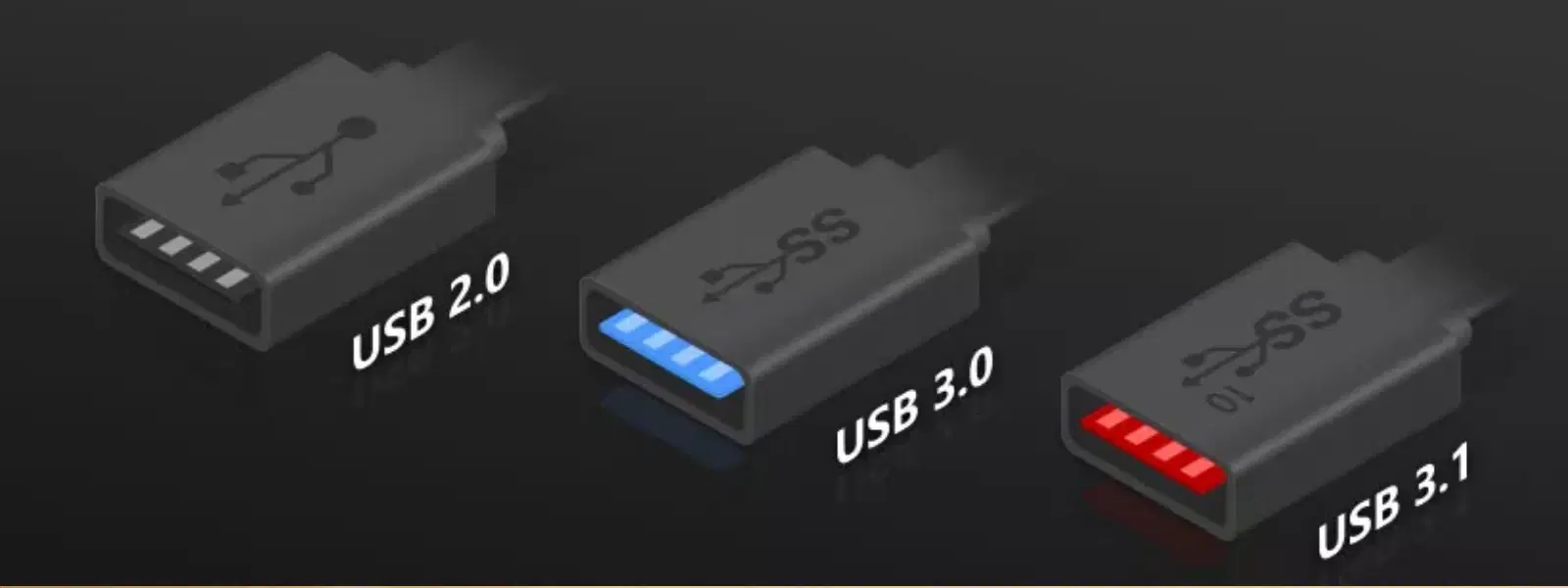
When physically comparing the two, one key difference is in the connector design. USB 3.0 ports are commonly identified by a blue colour coding and might also be marked with the letters “SS,” highlighting their SuperSpeed capabilities. Being able to quickly differentiate between the two can help ensure that you plug in your device to the correct port, maximising performance.
In addition to speed, power output is another factor where USB 3.0 takes the lead. USB 2.0 is often sufficient for basic peripherals such as keyboards and mice. However, USB 3.0’s higher power output is better suited for charging devices, powering external hardware, and handling more energy-demanding gadgets. This means it not only transfers data more rapidly but can also support more robust functions.
USB 3.0 offers improved bandwidth allocation, allowing simultaneous data transfers without compromising performance. It is also designed to be energy efficient; enhanced sleep mode functionality helps reduce power consumption when your devices are idle. These features add significant value especially when you are using devices for extended periods or on the go—a benefit for young professionals and tech enthusiasts alike.
Insight Corner – "USB 3.0 Is 10x Faster Than USB 2.0 – But Compatibility Is Key!"
While USB 3.0 offers incredible speed enhancements, it remains backward compatible with USB 2.0 devices. This seamless integration allows you to continue using older peripherals, though at lower performance levels. Understanding these nuances helps you align your choices with your device needs.
Beyond USB 3.0, technological progress has led to the development of newer standards such as USB 3.1, USB 3.2, and the increasingly popular USB-C connectors. These innovations further enhance data transfer speeds, power delivery, and overall usability. However, when choosing a USB standard, practicality is key. Depending on your usage and budget, USB 3.0 continues to offer a balanced performance boost that suits many modern applications.
When assessing your needs, consider the following factors as a checklist:
Speed Requirements: Are you frequently transferring large files or using external drives? Opt for a standard that offers higher transfer rates.
Compatibility: Check if your existing devices are USB 2.0 or USB 3.0 compatible, as this will influence overall performance.
Budget Considerations: While USB 3.0 may be slightly more expensive, its superior performance could justify the investment, particularly if your work relies heavily on quick data transfers.
Remember, your choice should reflect both your current needs and any plans for future upgrades. Shopping smartly for technology is part of progressing in life, much like the value-added benefits available through Tata Neu. Not only do you get the latest tech insights, but every purchase also rewards you with NeuCoins. These NeuCoins can be used across a wide range of brands and are awarded both in-store and online, ensuring you save more as you experience cutting-edge technology.
Yes, USB 2.0 devices can be used in USB 3.0 ports, but they will operate at USB 2.0 speeds.
USB 3.0 ports are often blue and may be labelled with "SS" to denote SuperSpeed. Checking your device specifications can also provide clarity.
For faster data transfer, USB 3.0 is the recommended choice. USB 2.0 flash drives serve well for basic storage needs and can offer a more affordable solution.
The device will work as normal, but it will operate at USB 2.0 speeds since the port will adjust to the lower standard.
To summarise, USB 3.0 offers substantial improvements in speed and functionality over USB 2.0. Its higher data transfer rates, increased power output, and enhanced features make it the ideal choice for modern computing needs. However, if your current setup primarily involves basic connectivity, USB 2.0 remains a reliable option. The decision ultimately hinges on your specific requirements, existing device compatibility, and budget considerations.
In conclusion, taking the time to understand the nuances between these USB standards can empower you as a buyer. As you navigate the world of technology, having access to clear information and a trusted platform like Tata Neu ensures that even a technical decision such as this is made with confidence and clarity. Explore more about USB technology advancements and see how you can benefit from rewards like NeuCoins, making each purchase a step towards a smarter, more rewarding shopping experience.
