





Consumer Electronics
•07 min read

Choosing the right TV size is crucial for an optimal viewing experience. Understanding how TV size is measured can help you make an informed decision that enhances your entertainment setup. At Tata Neu, we are committed to providing expert advice and a seamless shopping experience to ensure you find the perfect TV for your needs.
When it comes to selecting a TV, the size is one of the most critical factors. A TV that is too small or too large can affect your viewing experience, making it uncomfortable or less enjoyable. This guide will help you understand how TV size is measured and provide you with the knowledge needed to make the best choice for your space.
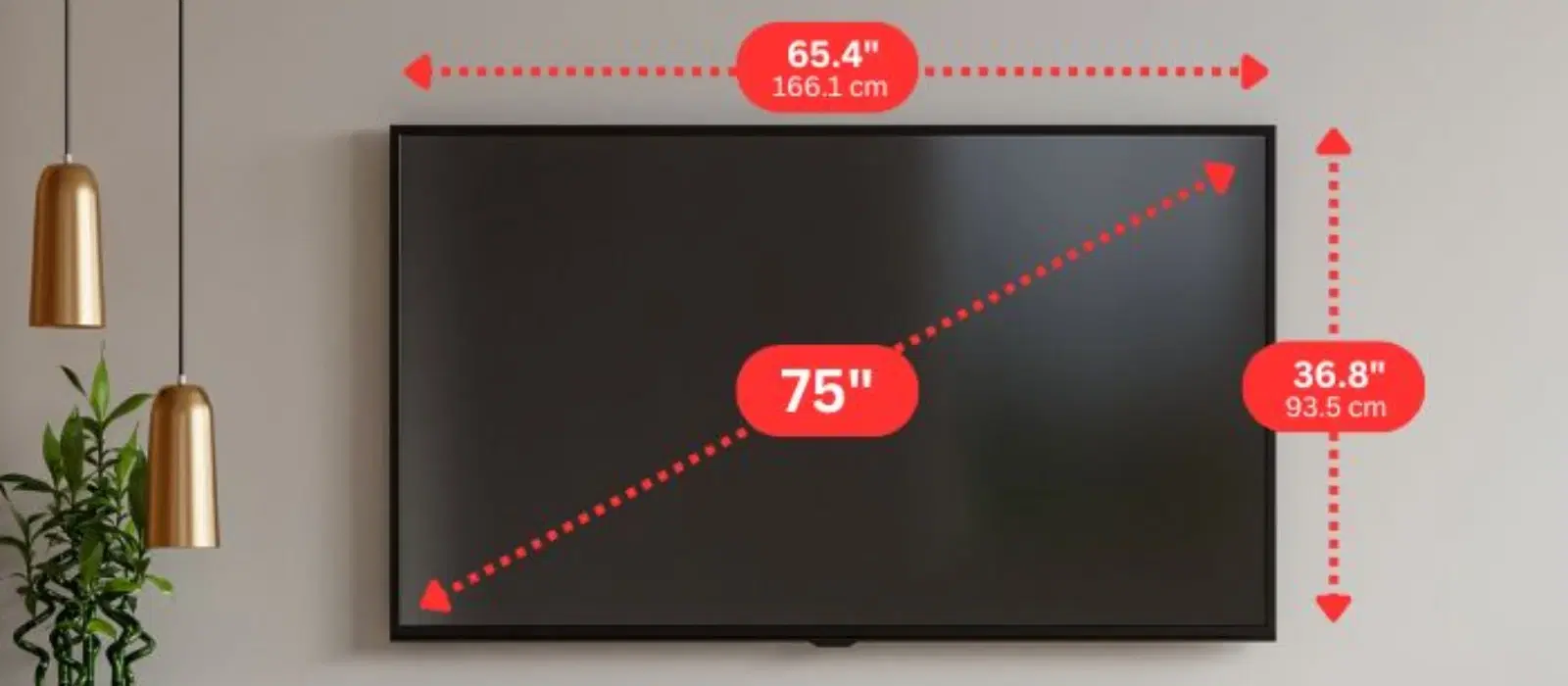
TV size is measured diagonally from one corner of the screen to the opposite corner. This diagonal measurement is the standard way to describe the size of a TV, and it's essential to understand this concept when shopping for a new television. This method of measuring TV diagonally ensures consistency across different brands and models.
For example, a 55-inch TV means the screen measures 55 inches from the bottom left corner to the top right corner. This measurement does not include the bezel or the frame around the screen, so the actual dimensions of the TV may be slightly larger.
It's important to differentiate between the screen size and the overall TV dimensions. While the screen size refers to the diagonal measurement of the display area, the TV dimensions include the height, width, and depth of the entire unit. Understanding TV screen dimensions will help you determine if the TV will fit in your intended space.
For instance, a 55-inch TV might have a width of about 48 inches and a height of around 27 inches. The depth can vary depending on the design and technology used, such as LED, OLED, or QLED.
To measure your TV accurately, you'll need a few basic tools: a tape measure, a pen, and paper. These tools are readily available and make the measurement process straightforward and convenient.
Follow these steps to measure your TV screen diagonally:
Place one end of the tape measure at the bottom left corner of the screen.
Extend the tape measure to the top right corner of the screen.
Record the measurement in inches. This is your TV's screen size.
This process ensures you know how to measure TV screen accurately.
To measure the overall dimensions of your TV, follow these steps:
Measure the height from the bottom to the top of the TV.
Measure the width from the left side to the right side of the TV.
Measure the depth from the front to the back of the TV.
These measurements will help you with screen size calculation and ensure your TV fits perfectly in your space.
For a quick reference, use the following TV screen size chart:
Screen Size | Recommended Viewing Distance |
|---|---|
32 inches | 4-5 feet |
40-43 inches | 5-7 feet |
48-50 inches | 6-8 feet |
55 inches | 7-9 feet |
65 inches | 8-10 feet |
When selecting a TV size, consider the following factors:
Room Size and Viewing Distance: Ensure the TV size matches the room size and the distance from which you'll be watching.
Personal Preferences and Usage Scenarios: Think about how you'll use the TV, whether for movies, gaming, or general viewing.
Expert Guidance and Customer Support: At Tata Neu, we offer expert advice and customer support to help you make the best choice.
Additionally, consider the resolution of the TV. Higher resolution TVs, such as 4K or 8K, allow you to sit closer to the screen without noticing pixelation, which can enhance your viewing experience.
Did you know that the optimal viewing distance for a TV is approximately 1.5 to 2.5 times the diagonal screen size? This ensures a comfortable and immersive viewing experience. For example, if you have a 55-inch TV, the ideal viewing distance would be between 6.9 and 11.5 feet.
At Tata Neu, we understand the importance of advanced technology and convenience. Our TVs come with the latest features, including smart capabilities, high dynamic range (HDR), and multiple connectivity options. Whether you're a tech enthusiast or a casual viewer, we have a TV that suits your needs.
To determine the right TV size for your room, measure the viewing distance from your seating area to the TV. Use the TV size chart to match the screen size with the recommended viewing distance.
LED TVs use light-emitting diodes for backlighting, OLED TVs use organic compounds for self-illuminating pixels, and QLED TVs use quantum dots to enhance colour and brightness. Each type offers unique benefits in terms of picture quality and performance.
Measure the height, width, and depth of your entertainment unit and compare it with the TV dimensions. Ensure there is enough space for ventilation and easy access to ports and cables.
Buying a TV from Tata Neu offers several benefits, including rewards through NeuCoins, express delivery, and comprehensive after-sales support. Additionally, you can enjoy exclusive savings with the Tata Neu HDFC Bank credit card.
The viewing distance is crucial because it affects your comfort and the overall viewing experience. Sitting too close to a large TV can cause eye strain, while sitting too far from a small TV can make it difficult to see details. The recommended viewing distance ensures you get the best picture quality and comfort.
Yes, most modern TVs can be mounted on the wall. Ensure you use a compatible wall mount and follow the manufacturer's instructions for safe installation. Wall mounting can save space and provide a clean, modern look to your room.
In summary, understanding how TV size is measured is essential for making an informed purchase. Consider the room size, viewing distance, and personal preferences when selecting a TV. Explore Tata Neu’s range of TVs and take advantage of benefits like NeuCoins, express delivery, and expert advice. Visit Tata Neu’s website for more information and to make a purchase.
Always measure the TV diagonally for accurate screen size.
Consider room size and viewing distance when selecting a TV.
Use Tata Neu’s expert guidance and customer support for a hassle-free shopping experience.
Take advantage of rewards like NeuCoins and exclusive savings with the Tata Neu HDFC Bank credit card.
Ensure your TV fits your space and meets your viewing needs for the best experience.
