





Consumer Electronics
•05 min read

A functioning phone display is crucial for everyday tasks, from checking emails to watching videos. If you’ve ever wondered how to fix phone display, you’re in the right place. This guide will walk you through easy DIY repairs and highlight expert guidance from Tata Neu for more complex issues. Understanding the importance of a clear and responsive display can help you maintain your device better and make informed decisions when issues arise.
Cracked or shattered screens
Unresponsive touchscreens
Display discoloration or dead pixels
Accidental drops
Water damage
Manufacturing defects
These issues can significantly affect your phone's usability and may require immediate attention to prevent further damage.
Visual inspection for cracks
Functionality check for touch responsiveness
Conducting a thorough assessment can help you determine the extent of the damage and decide whether you can fix it yourself or need professional help.
Before attempting any repairs, ensure you back up your data to avoid losing important information. Use cloud storage services or transfer your data to another device to keep it safe.
Ensure you have the essential tools like screwdrivers, suction cups, and adhesive strips ready. Having the right tools on hand can make the repair process smoother and more efficient.
Use a screen protector to prevent further damage.
Apply a temporary fix with clear tape.
These quick fixes can help you manage minor cracks until you can get a more permanent solution.
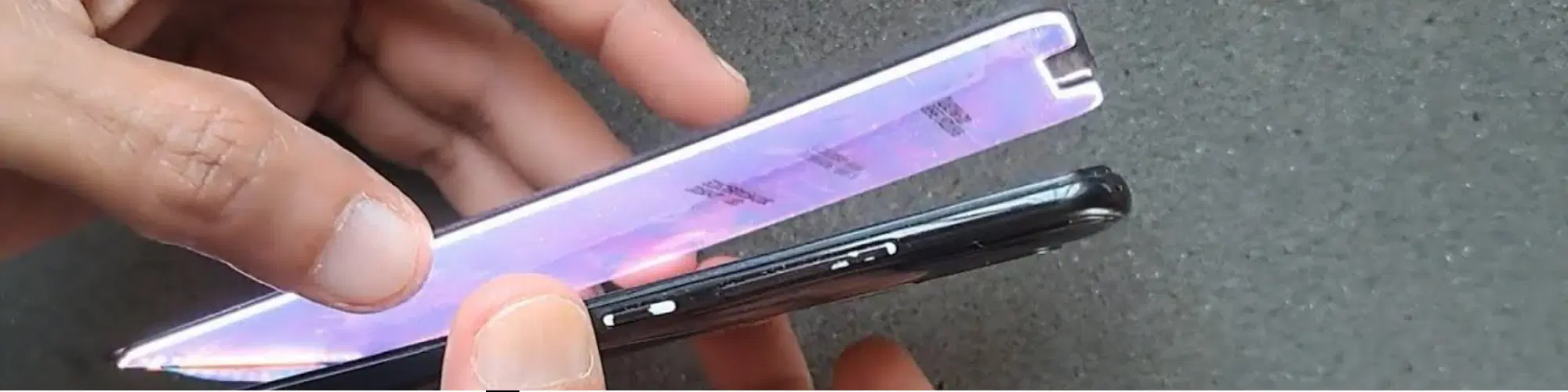
Follow these steps to replace the screen:
Power off your phone.
Remove the back cover and battery.
Unscrew the screws holding the screen in place.
Use a suction cup to carefully lift the screen.
Disconnect the screen from the motherboard.
Connect the new screen and reassemble the phone.
Remember to take safety precautions to avoid further damage. If you're unsure about any step, it's best to consult a professional.
If the damage is extensive, consider using Tata Neu’s ZipCare services for professional repairs. They offer reliable and efficient service, ensuring your phone is as good as new. ZipCare provides two primary service segments: Protect, which covers accidental and liquid damage, and Maintain, which focuses on the upkeep and maintenance of your device.
Restart the device.
Check for software updates.
Sometimes, a simple restart or software update can resolve touchscreen issues. If the problem persists, it may indicate a hardware issue that needs professional attention.
Adjust display settings.
Check for app-specific issues.
Display discoloration can often be fixed by adjusting your phone's display settings or checking if a specific app is causing the issue.
Use pixel repair apps.
Try gentle screen massage techniques.
Dead pixels can be annoying, but using pixel repair apps or gentle screen massage techniques can sometimes revive them.
Invest in screen protectors and sturdy phone cases.
Protective accessories can significantly reduce the risk of damage to your phone's display. Consider investing in high-quality screen protectors and sturdy cases to keep your phone safe.
Clean the screen with appropriate materials.
Avoid exposure to extreme temperatures.
Regular maintenance, such as cleaning your screen with appropriate materials and avoiding exposure to extreme temperatures, can help prolong the life of your phone's display.
Did you know? Tata Neu offers exclusive EMI plans and cashback offers through NeuCoins. You can also benefit from express delivery for urgent needs. Shopping with Tata Neu and Croma ensures you get advanced technology with a wide range of budgets, partnerships with trusted global brands, and unmatched after-sales support with warranties, installations, and ZipCare services.
If your screen is cracked, unresponsive, or has discoloration, it may need replacement.
Using a phone with a cracked screen can be unsafe and may cause further damage.
Try restarting the device and check for software updates. If the issue persists, seek professional help.
Use a screen protector and a sturdy case, and handle your phone with care.
While some third-party services are reliable, it’s best to use trusted services like Tata Neu’s ZipCare for quality assurance.
Tata Neu’s ZipCare services offer comprehensive protection and maintenance for your devices, ensuring they stay in top condition. With ZipCare, you get reliable repairs, protection against accidental and liquid damage, and regular maintenance services.
By shopping with Tata Neu, you can take advantage of exclusive EMI plans, cashback offers through NeuCoins, and express delivery for urgent needs. Additionally, the Tata Neu HDFC Bank credit card offers extra savings, making your shopping experience even more rewarding.
Fixing a phone display doesn’t have to be daunting. Whether you opt for a DIY approach or seek professional help, understanding the process is key. Remember, Tata Neu offers comprehensive after-sales support and expert advice to ensure your phone remains in top condition. Visit Tata Neu for reliable products and services, and enjoy the benefits of NeuCoins and express delivery.
