
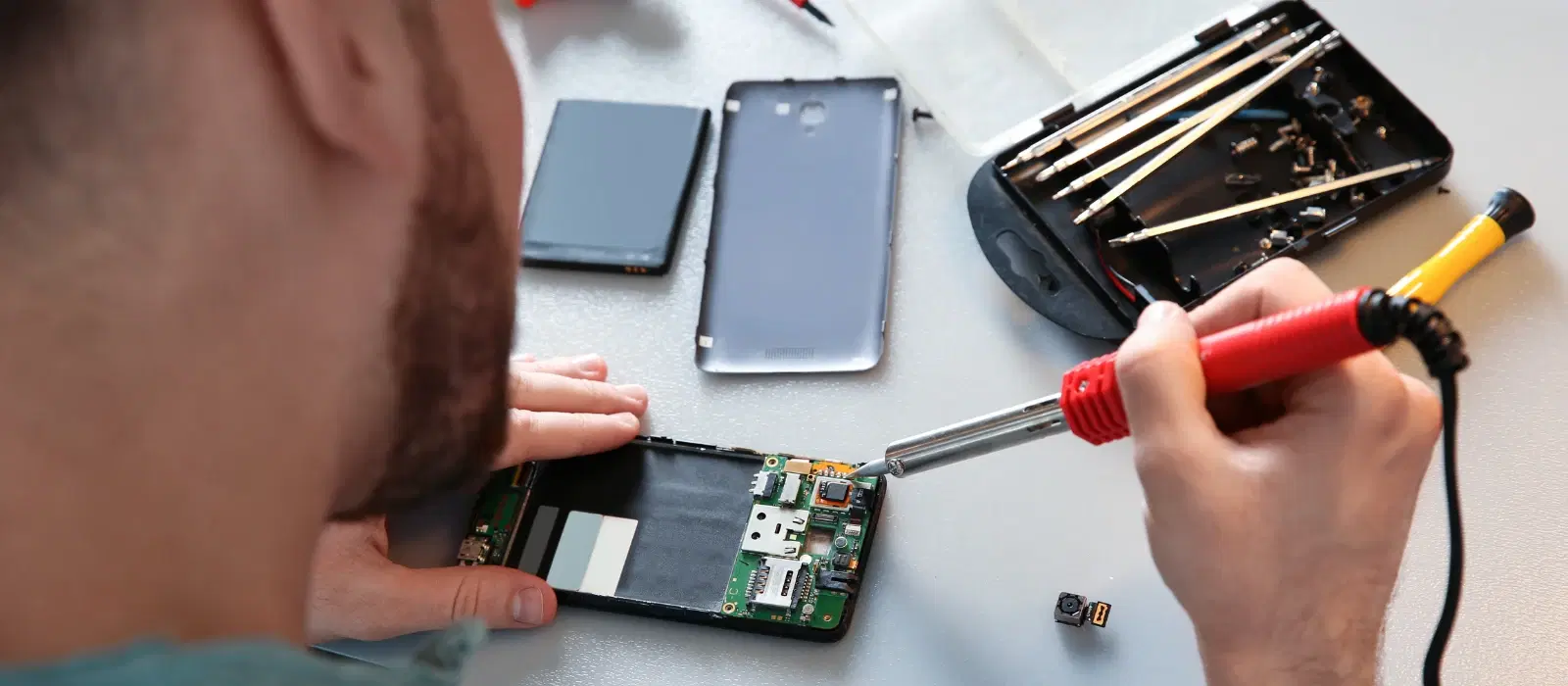
How to Fix Broken Display on Phone: DIY Repair Tips

Consumer Electronics

05 min read

How to Fix Broken Display on Phone: DIY Repair Tips

Environics Enviroglobe Anti Radiation Ball for House & Car (001EG, Grey)

Environics Enviroglobe Anti Radiation Ball for House & Car (001EG, Grey)

<p><strong>Why buy Environics Enviroglobe Anti Radiation Ball for House &amp; Car</strong></p> <p>&nbsp;</p> <ul> <li><strong>Provides E-Smog and Radiation Protection</strong> for healthier homes and families</li> <li><strong>It Covers A Radius</strong> of 250 sq.ft protect you and your loved ones from harmful radiation</li> <li><strong>Clinically Tested EMF Harmonizer</strong> that provides us 360-degree protection from radiation sources that are beyond our control</li> </ul> <p>&nbsp;</p> <p>Buy the <strong>Environics Enviroglobe Anti Radiation Ball for House &amp; Car</strong> which is based on Envirochip&rsquo;s radiation protection technology that helps you protect you and your loved ones from harmful radiation within an area of 250 sq. feet. You can extend the range of protection by placing multiple Enviroglobes at equal distances from one another. It is a clinically tested EMF harmonizer and provides us 360-degree protection from radiation sources that are beyond our control. Electromagnetic Radiation (EMR) refers to the constant waves of the electromagnetic field (EMF) produced by wireless communication devices such as mobile phones, laptops, Wi-Fi routers, and other sources such as mobile towers and high-tension wirelines, etc. However, The human body is accustomed to random waves and hence the constant exposure to electromagnetic radiation causes serious biological disorders such as higher stress and fatigue, irritation, headache, weakened immunity, cancer, fertility issues to name a few. The technology used in Enviroglobe changes the nature of electromagnetic radiation from constant to random waveform making it human body-friendly.</p> <p>&nbsp;</p> <p>When you get <strong>Environics Enviroglobe Anti Radiation Ball for House &amp; Car</strong> online, you also get awesome companion for your home. It comes with Internationally tested and certified technology. No need of batteries or adaptors, you can simply charge by placing it under the sunlight, for only a couple of minutes every week. Enviroglobe is simple to use. Simply place it at your desk, table, living room, bedroom, car, office space, absolutely wherever you want, and get a radiation protected zone of up to 250 sq. feet. It provides e-smog and radiation protection for healthier homes and families. Purchase&nbsp;<strong>Environics Enviroglobe Anti Radiation Ball for House &amp; Car</strong> online, now!</p>

27044499
Earn NeuCoins

We've all been there – that heart-stopping moment when your phone slips from your hand and lands screen-first on the ground. As you pick it up, you see the dreaded cracks spider-webbing across the display. But don't worry, we're here to help you through the process of fixing a broken phone display at home. With the right tools and guidance, you can save money and extend the life of your device.

Understanding the Problem

First, let's understand the different types of screen damage:

  • Minor cracks: Small, superficial cracks that don't affect the phone's functionality.

  • Major cracks: Larger cracks that may affect touch sensitivity and visibility.

  • Complete shattering: The screen is completely shattered, making the phone difficult to use.

Addressing screen damage promptly is crucial to prevent further damage and maintain your phone's functionality. Ignoring minor cracks can lead to more severe damage over time, potentially affecting the internal components of your device.

DIY Repair Tips

Assessing the Damage

Before you start, assess the extent of the damage. Check if your phone is still functional. If the display is responsive and the phone turns on, you can proceed with the repair. However, if the screen is completely unresponsive or the phone doesn't turn on, it might be best to seek professional help.

Gathering Necessary Tools and Materials

You'll need the following tools:

  • Screwdrivers

  • Suction cup

  • Plastic picks

  • Replacement screen (available at Croma)

  • Tweezers

  • Adhesive strips

Ensure you have a clean, well-lit workspace to perform the repair. Organize your tools and materials beforehand to make the process smoother.

Step-by-Step Repair Process

1. Power Off the Phone

Ensure your phone is turned off to avoid any electrical damage during the repair. If possible, remove the battery to eliminate any risk of short-circuiting.

2. Remove the Screws

Use the appropriate screwdriver to remove the screws from the phone's frame. Keep them safe as you'll need them later. It's helpful to use a magnetic mat to keep the screws organized and prevent them from getting lost.

SVARAS Home Rechargeable UV Sterilizer (Voice Alarm, X2 Pro, White)

SVARAS Home Rechargeable UV Sterilizer (Voice Alarm, X2 Pro, White)

<p><b>HEUV Technology</b><br/><br/>Thanks to the HEUV technology, the SVARAS Home X2 Pro UV Steriliser effectively targets and eliminates a wide range of viruses and bacteria, including those responsible for illnesses such as the coronavirus. As a result, you can have peace of mind knowing that you can effectively protect yourself and your family from potential health threats.<br/><br/><br/><b>Enhanced Sterilisation</b><br/><br/>This rechargeable UV steriliser provides optimal sterilisation capabilities, which eliminates harmful germs. This high level of effectiveness makes it an ideal choice for homes, offices, and shops, ensuring that surfaces remain clean and safe. Thus, you can trust this steriliser to protect your health and the health of your loved ones by efficiently disinfecting various surfaces.<br/><br/><br/><b>User-Friendly Functionality</b><br/><br/>This home steriliser boasts convenient features that enhance its usability. It includes a voice alarm that signals when the sterilisation process is complete, ensuring you never forget to turn it off. Additionally, the device offers a safe automatic power-off feature, which enhances safety during operation. Convenient charging capabilities further simplify the user experience, which makes it easy to keep the steriliser ready for action.<br/><br/><br/><b>Eco-Friendly Design</b><br/><br/>Designed with sustainability in mind, this SVARAS steriliser promotes an eco-friendly lifestyle. It operates without mercury or harsh chemicals, which makes it safe for both users and the environment. This design choice allows you to maintain a clean living space while reducing your ecological footprint. Moreover, the sleek, modern appearance of the steriliser ensures that it complements any decor.</p>

22647999
Earn NeuCoins

3. Use Suction Cup to Lift the Screen

Place the suction cup on the screen and gently lift it to create a gap between the screen and the phone body. If the screen is severely cracked, you may need to use adhesive tape to secure the suction cup.

4. Disconnect the Screen from the Body

Use plastic picks to carefully disconnect the screen from the phone's body. Be gentle to avoid damaging internal components. Take your time and work slowly to prevent any accidental damage.

5. Attach the New Screen

Carefully align the new screen with the phone's body and connect it. Ensure all connectors are securely in place. Use adhesive strips to secure the new screen, ensuring it is firmly attached to the phone's frame.

6. Reassemble the Phone

Reattach the screws and ensure everything is securely fastened. Double-check that all components are in place and that there are no loose parts.

Testing the New Screen

Power on your phone and check the new screen's functionality and responsiveness. If everything works fine, you've successfully repaired your phone! Test all features, including touch sensitivity, display brightness, and any sensors that may have been affected by the repair.

When to Seek Professional Help

DIY repairs may not always be advisable. Seek professional help if:

  • The damage is severe.

  • You lack the necessary tools or expertise.

  • The phone is still under warranty, and DIY repair may void it.

Consider Tata Neu's ZipCare services for professional assistance:

  • Protect: Coverage for accidental damage.

  • Maintain: Regular upkeep and maintenance.

ZipCare offers unmatched after-sales support, ensuring your device remains in top condition. With Tata Neu and Croma, you can trust that your phone is in good hands.

Additional Tips for Phone Screen Care

Juvo Personal Safety Alarm (PSB 01, Black)

Juvo Personal Safety Alarm (PSB 01, Black)

<p>Danger can overpower you at any time and your voice will not be enough in such situations to get the required aid. The amazing new <strong>Juvo PSB01 Personal Alarm</strong> is crafted for all ages and is a necessary precaution from all kinds of danger. It rings a very loud alarm at 120 dB as well as flashes the torch to warn people nearby about a danger. Whether you have a medical emergency or you are attacked by predators your voice may not be heard but this alarm will be enough to deter attackers or draw attention of people close by to give you the immediate assistance required.</p> <p><strong>Extremely Easy To Use</strong></p> <p>The <strong>Juvo PSB01 Personal Alarm</strong> is small and portable, can be attacked to even a keychain if you want. To start the siren all you need to do is separate or pull the metal key chain from the main black unit. The siren may go on for 1 1/2 hours in case nobody heard it in the first minutes. This is very important for girls returning home alone at night as it acts as a security anti-attack panic alarm that is sure to scare off a molester. Its easy portability accentuates its use.</p> <p><strong>Lights Your Way</strong></p> <p>The little and portable <strong>Juvo PSB01 Personal Alarm</strong> also features a small LED torch that helps you find your way in the dark. Don&rsquo;t be scared of dark alleys when you have this with you because it is equipped to save you from all dangers.</p>

474890
Earn NeuCoins
  • Use a screen protector to prevent future damage.

  • Invest in a sturdy phone case.

  • Avoid placing your phone in risky environments.

  • Keep your phone away from extreme temperatures and direct sunlight.

  • Regularly clean your phone screen with a microfiber cloth to remove dust and fingerprints.

Value-Adding Insights

Did You Know?

Using high-quality replacement parts can extend the life of your phone. Croma offers express delivery for urgent needs, ensuring you get your replacement parts quickly. Additionally, Croma provides a wide range of gadgets and accessories, making it a one-stop shop for all your tech needs.

FAQs

Can I fix a cracked phone screen at home?

Yes, with the right tools and instructions, minor cracks can be fixed at home. However, for major damage, professional repair is recommended.

How much does it cost to replace a phone screen?

The cost varies depending on the phone model and where you purchase the replacement screen. Croma offers competitive prices on replacement screens and other phone accessories.

Is it worth repairing a broken phone screen?

Yes, repairing can be cost-effective compared to buying a new phone. It also helps reduce electronic waste, making it an environmentally friendly choice.

How long does it take to repair a phone screen?

DIY repairs can take 1-2 hours, while professional services may vary. ZipCare offers quick and reliable repair services, ensuring minimal downtime for your device.

What should I do if my phone screen keeps breaking?

Consider investing in a high-quality screen protector and a sturdy phone case. Additionally, avoid placing your phone in risky environments and handle it with care.

Conclusion

Fixing a broken phone display at home is possible with the right tools and guidance. Remember to assess the damage, gather the necessary tools, and follow the step-by-step process. If in doubt, seek professional help from Tata Neu's ZipCare services. Explore Tata Neu and Croma for quality replacement parts and expert services. Leave your comments or questions below for further assistance.

Sangria Experience Logo