
Consumer Electronics
•03 min read

<p>Danger can overpower you at any time and your voice will not be enough in such situations to get the required aid. The amazing new <strong>Juvo PSB01 Personal Alarm</strong> is crafted for all ages and is a necessary precaution from all kinds of danger. It rings a very loud alarm at 120 dB as well as flashes the torch to warn people nearby about a danger. Whether you have a medical emergency or you are attacked by predators your voice may not be heard but this alarm will be enough to deter attackers or draw attention of people close by to give you the immediate assistance required.</p> <p><strong>Extremely Easy To Use</strong></p> <p>The <strong>Juvo PSB01 Personal Alarm</strong> is small and portable, can be attacked to even a keychain if you want. To start the siren all you need to do is separate or pull the metal key chain from the main black unit. The siren may go on for 1 1/2 hours in case nobody heard it in the first minutes. This is very important for girls returning home alone at night as it acts as a security anti-attack panic alarm that is sure to scare off a molester. Its easy portability accentuates its use.</p> <p><strong>Lights Your Way</strong></p> <p>The little and portable <strong>Juvo PSB01 Personal Alarm</strong> also features a small LED torch that helps you find your way in the dark. Don’t be scared of dark alleys when you have this with you because it is equipped to save you from all dangers.</p>
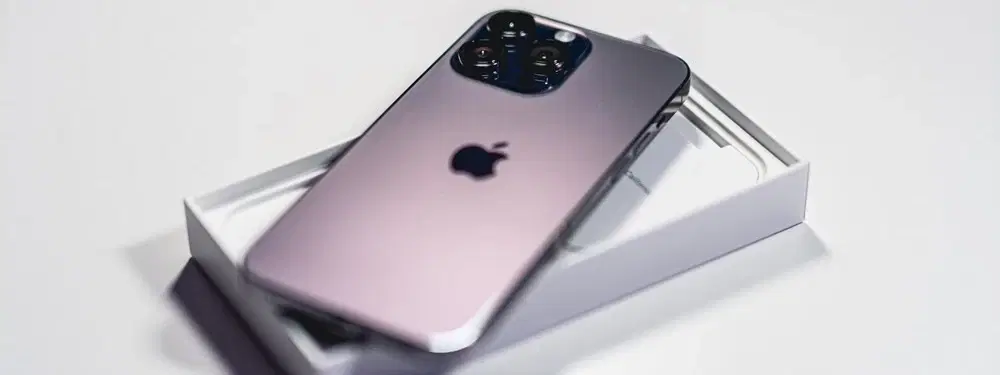
Did you know you can turn your iPhone into a powerful internet-sharing device using USB tethering? This useful feature lets you share your iPhone's internet connection with your PC or laptop via a USB cable – a practical solution for uninterrupted connectivity when you need it most. Plus, with Tata Neu, you can enjoy rewards like earning NeuCoins on your purchases and benefit from Express Delivery for orders placed before 6PM.
USB tethering is simply a method to share your iPhone's internet connection with another device through a USB connection. It provides a stable and reliable connection that typically offers faster speeds compared to Wi-Fi tethering. This approach is ideal when you require a secure connection, especially for work or important tasks.
Choosing USB tethering on your iPhone means you benefit from a more consistent internet experience. The connection is less prone to interruptions and is usually faster and more secure than other methods. Whether you're sharing documents with colleagues or streaming content, this feature ensures that your online experience is both smooth and efficient.
Before you dive into USB tethering, make sure your iPhone is running the latest iOS version. Also, confirm that your computer is compatible. Whether you use Windows 10/11 or macOS, ensuring that your system is up-to-date plays a crucial role in a seamless tethering experience.
Next, navigate to Settings and select Personal Hotspot on your iPhone, then toggle it on. It’s important to set or verify your Wi-Fi password, as this step is essential for hotspot functionality. Although several tethering modes are available – Wi-Fi, Bluetooth, and USB – here we focus on using USB for its superior performance and reliability.

<p><strong>Why buy Environics Enviroglobe Anti Radiation Ball for House & Car</strong></p> <p> </p> <ul> <li><strong>Provides E-Smog and Radiation Protection</strong> for healthier homes and families</li> <li><strong>It Covers A Radius</strong> of 250 sq.ft protect you and your loved ones from harmful radiation</li> <li><strong>Clinically Tested EMF Harmonizer</strong> that provides us 360-degree protection from radiation sources that are beyond our control</li> </ul> <p> </p> <p>Buy the <strong>Environics Enviroglobe Anti Radiation Ball for House & Car</strong> which is based on Envirochip’s radiation protection technology that helps you protect you and your loved ones from harmful radiation within an area of 250 sq. feet. You can extend the range of protection by placing multiple Enviroglobes at equal distances from one another. It is a clinically tested EMF harmonizer and provides us 360-degree protection from radiation sources that are beyond our control. Electromagnetic Radiation (EMR) refers to the constant waves of the electromagnetic field (EMF) produced by wireless communication devices such as mobile phones, laptops, Wi-Fi routers, and other sources such as mobile towers and high-tension wirelines, etc. However, The human body is accustomed to random waves and hence the constant exposure to electromagnetic radiation causes serious biological disorders such as higher stress and fatigue, irritation, headache, weakened immunity, cancer, fertility issues to name a few. The technology used in Enviroglobe changes the nature of electromagnetic radiation from constant to random waveform making it human body-friendly.</p> <p> </p> <p>When you get <strong>Environics Enviroglobe Anti Radiation Ball for House & Car</strong> online, you also get awesome companion for your home. It comes with Internationally tested and certified technology. No need of batteries or adaptors, you can simply charge by placing it under the sunlight, for only a couple of minutes every week. Enviroglobe is simple to use. Simply place it at your desk, table, living room, bedroom, car, office space, absolutely wherever you want, and get a radiation protected zone of up to 250 sq. feet. It provides e-smog and radiation protection for healthier homes and families. Purchase <strong>Environics Enviroglobe Anti Radiation Ball for House & Car</strong> online, now!</p>
Start by using a certified Lightning USB cable to connect your iPhone to your computer. Give your device a moment to be recognised as a network connection. This initial step is key to ensuring your connection is secure and stable.
On your iPhone, head over to the Personal Hotspot settings and switch on the "Allow Others to Join" option. Your PC should now display your iPhone as a potential internet source under its network connections. This simple selection process helps share your robust internet connection effortlessly.
Once you have enabled USB tethering, check your computer’s internet access. Ensuring that your connection is active and functioning confirms that your iPhone is successfully sharing its internet connection with your device.
If you experience any disruption or find that tethering is not working as expected, try restarting both your iPhone and your PC. A simple reboot can often iron out minor glitches and restore proper functionality. Additionally, ensure your iOS is updated to the latest version to avoid compatibility issues.
Users on Windows 10/11 should ensure that all necessary iPhone drivers are installed. Sometimes, third-party software may interfere with the process, so it is wise to keep your system updated and free from conflicts.
Mac users should verify that their system recognises the iPhone as a network device. In some cases, updating macOS can resolve any connectivity hiccups, ensuring that tethering works as intended.

<p><strong>Effortless Performance</strong><br /> <br /> The sabichi Mono 24cm Whisk is designed for smooth and efficient whisking. Its polished stainless-steel wires and narrow shape ensure even blending and make it ideal for small bowls or containers. From whipping meringues to beating eggs, this whisk brings ease to every task.<br /> <br /> <br /> <strong>Versatile Whisking Tool</strong><br /> <br /> Whether you're blending batters, keeping lumps out of sauces, or creating airy meringues, this 24cm whisk is up to the challenge. It’s a kitchen essential that adapts to various culinary needs with precision and consistency.<br /> <br /> <br /> <strong>Safe for All Cookware</strong><br /> <br /> The whisk is gentle on all surfaces, including non-stick, ceramic, and metal cookware. You can whisk worry-free without scratching or damaging your kitchenware. This ensures long-lasting durability for your pots and pans.<br /> <br /> <br /> <strong>Ergonomic Design</strong><br /> <br /> Featuring an innovative handle with a soft, comfortable grip, this whisk absorbs pressure for strain-free usage. Its contoured shape ensures a secure hold, even during prolonged whisking tasks, for an effortless cooking experience.<br /> <br /> <br /> <strong>Convenient Storage</strong><br /> <br /> Equipped with a handy hanging loop, the whisk offers easy storage. It’s always within reach while saving counter and drawer space, making it as practical as it is efficient.</p>
Expert Tip: Maximise Your USB Tethering Speed
Did you know that disabling background apps and downloads on your iPhone can significantly improve USB tethering speeds? By ensuring that your device’s internet connection is dedicated to the task at hand, you can enjoy a more stable and faster connection. This is an excellent way to make sure your online experience remains uninterrupted, whether for work or leisure.
Yes, iPhones support USB tethering via the Personal Hotspot feature, allowing you to share your internet connection with other devices through a secure connection.
Common reasons include an outdated iOS, issues with the USB cable, or missing drivers on your computer. Often, restarting your devices and ensuring they are updated can resolve these issues.
Simply enable Personal Hotspot on your iPhone, connect it to your laptop using a certified USB cable, and select your iPhone under the network settings on your laptop.
Yes, USB tethering operates independently of Wi-Fi. This means you can share your internet connection directly through a USB cable without activating Wi-Fi.
Generally, USB tethering tends to be faster and more stable because the connection is less susceptible to interference. This makes it an excellent choice when you require a strong and reliable internet connection.
In summary, USB tethering is a simple yet powerful way to share your iPhone’s internet connection with your computer. By following the steps outlined in this guide, you can easily enable USB tethering, troubleshoot any common issues, and enjoy a steady and fast connection. With this easy method, your iPhone transforms into a reliable network hub, enabling seamless connectivity when you need it most. Explore Tata Neu’s consumer electronics offerings for expert guidance and robust after-sales support, and make the most of your purchases with rewards like NeuCoins and Express Delivery benefits.
