
Consumer Electronics
•04 min read

<p>Danger can overpower you at any time and your voice will not be enough in such situations to get the required aid. The amazing new <strong>Juvo PSB01 Personal Alarm</strong> is crafted for all ages and is a necessary precaution from all kinds of danger. It rings a very loud alarm at 120 dB as well as flashes the torch to warn people nearby about a danger. Whether you have a medical emergency or you are attacked by predators your voice may not be heard but this alarm will be enough to deter attackers or draw attention of people close by to give you the immediate assistance required.</p> <p><strong>Extremely Easy To Use</strong></p> <p>The <strong>Juvo PSB01 Personal Alarm</strong> is small and portable, can be attacked to even a keychain if you want. To start the siren all you need to do is separate or pull the metal key chain from the main black unit. The siren may go on for 1 1/2 hours in case nobody heard it in the first minutes. This is very important for girls returning home alone at night as it acts as a security anti-attack panic alarm that is sure to scare off a molester. Its easy portability accentuates its use.</p> <p><strong>Lights Your Way</strong></p> <p>The little and portable <strong>Juvo PSB01 Personal Alarm</strong> also features a small LED torch that helps you find your way in the dark. Don’t be scared of dark alleys when you have this with you because it is equipped to save you from all dangers.</p>
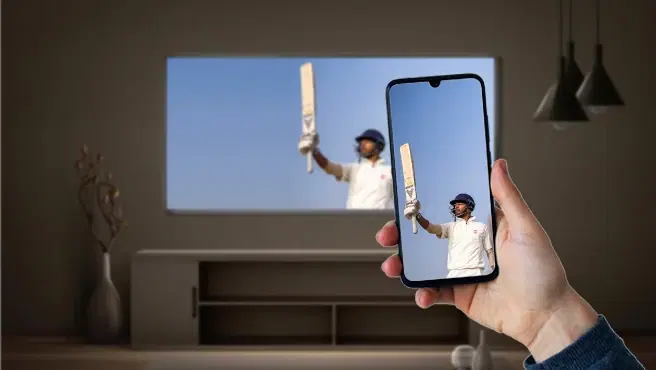
Imagine watching your favourite mobile videos, photos, or even playing games on a much larger screen. Sounds exciting, right? This is where screen mirroring comes into play, allowing you to connect your mobile device with your smart TV, and enjoy your content on a bigger canvas. With the advancements in technology, connecting your mobile device to a smart TV has never been easier, offering a seamless and enhanced viewing experience.
Screen mirroring is a technology that enables you to replicate your mobile device’s screen on your TV. Whether you want to watch movies, share photos, or play games, screen mirroring offers a seamless and enhanced viewing experience. In this guide, we will explore various methods on how to connect mobile with smart TV and make the most out of your devices.
Screen mirroring, also known as screen casting, is a feature that allows you to display your mobile device’s screen on a TV. This technology works by establishing a wireless connection between your mobile device and TV, enabling the content from your phone to be displayed on the larger screen. The benefits of screen mirroring include:
Enhanced Viewing Experience: Enjoy your favourite content on a larger screen with better sound and picture quality.
Convenience: Easily share photos, videos, and presentations with family and friends without the need for cables.
Versatility: Use your TV as a second monitor for gaming, browsing, or working.
Most modern smart TVs come with built-in screen mirroring features, making it easy to connect your mobile device. Here’s how you can do it:
Ensure both your mobile device and smart TV are connected to the same Wi-Fi network.
On your TV, navigate to the screen mirroring option (this may vary by brand and model).
On your mobile device, enable screen mirroring from the settings menu.
Select your TV from the list of available devices, and your mobile screen will be mirrored on the TV.
If your TV does not have built-in screen mirroring features, you can use third-party apps to connect your mobile device. Some popular TV casting apps include Google Home, Miracast, and AirDroid. Here’s how to use them:

<b>Why Buy Environics Device Disinfector</b><ul><li><b></b> for optimised disinfection</li><li><b></b> makes sure all the germs are killed</li></ul><p>To prevent harmful bacteria and fungi from getting in contact with you, buy <b>Environics Device Disinfector</b>. The usability of your device disinfector may be affected if its installation is complex. As this device disinfector has the it prevents the extra-spill and wastage of sanitizer. Your residence and office will stay clean and hygienic with products from this device disinfector that have 99.99% high resistance against germs and viruses. </p><p>The <b>Environics Device Disinfector's</b> price is cost-effective so you don't have to adjust your budget. The longer it takes for the device disinfector to disinfect, the longer you will have to wait. As a result of its efficient and effective operation, this device disinfector requires only to inject. Your device disinfector needs to have the latest technology to make sure it kills all the germs. As this device disinfector has the to prevent viruses, you can rest assured. Purchase the <b>Environics Device Disinfector</b> online at this instant!</p>
Download and install the app on both your mobile device and TV.
Open the app and follow the on-screen instructions to connect and mirror your screen.
Select your TV from the list of available devices, and your mobile screen will be mirrored on the TV.
A wired connection using an HDMI cable is another reliable method to connect your mobile device to your TV. Here’s how you can do it:
Connect your mobile device to the TV using an HDMI adapter and cable.
Select the appropriate HDMI input on your TV.
Your mobile screen will be mirrored on the TV.
Ensure Compatibility: Check if your mobile device and TV are compatible with screen mirroring before attempting to connect.
Update Software: Keep both your mobile device and TV updated to avoid any connectivity issues.
Stable Internet Connection: A strong Wi-Fi signal ensures a seamless screen mirroring experience.
Use an HDMI cable or a USB-C to HDMI adapter.

<p><strong>Why buy iGear Health Digital Pulse Monitor/Oximeter</strong></p> <p> </p> <ul> <li><strong>Fast, Reliable Measurement</strong> of Oxygen Saturation (SpO2) and Pulse (PR bpm) within 5-8 seconds</li> <li><strong>Perfusion Index</strong> of 0.3% measures even the weakest of the Pulse</li> <li><strong>Auto Power Off</strong> when not in use</li> <li><strong>4 Direction Display</strong> and Multi-coloured Display for ease of reading</li> <li><strong>Infrared Sensor</strong> for seamless operation</li> </ul> <p> </p> <p>Stay healthy and fit by keeping a regular check of your oxygen level by bringing home the <strong>iGear Health Digital Pulse Monitor/Oximeter</strong>. Although, the Blood pressure monitor may be the most recognizable medical tool in the market, but Pulse Oximeter is a close second for the most-used medical device. Being fast and reliable, the <strong>iGear Health Digital Pulse Monitor/Oximeter</strong> measures the amount of oxygenated blood (Spo2) in your body, giving medical professionals an idea of how much oxygen your body is carrying to vital organs and tissues. It measures Oxygen Saturation (SpO2) and Pulse (PR bpm) within 5-8 seconds. It comes with a measuring range of 0 – 100% (Oxygen Saturation) and 25 – 250 bpm (Pulse Rate). It has accuracy in readings of Oxygen Concentration in the Blood range 0-100% (+/- 2%) and Pulse rate range 25-250 bpm (+/- 2 bpm). It comes with a Perfusion Index of 0.3%, which can measure even the weakest of the Pulse.</p> <p> </p> <p>Having the <strong>iGear Health Digital Pulse Monitor/Oximeter</strong> at home allows the patients to monitor vital signs with an extra layer. These tools give you a better view of your health and allow you to coordinate with your healthcare provider. If you have a condition that affects your blood oxygen levels -think sleep apnea, chronic obstructive pulmonary disease (COPD), asthma, lung cancer, or heart failure, among many other conditions you may benefit from an at-home Pulse Oximeter. It comes with Infrared Sensor that seamlessly records all the readings. The One-click measurement of the device makes it convenient to operate. Viewing the readings will no longer be a struggle. Thanks to the 4 direction display and multi-colored display that makes viewing the reading simple and easy. Being battery operated, it offers long-lasting usage having an auto power-off feature. So, wait no more! Order the <strong>iGear Health Digital Pulse Monitor/Oximeter</strong> online, right away!</p>
Yes, using apps like AirDroid or a compatible HDMI adapter.
Ensure both devices are on a strong Wi-Fi network and close unnecessary apps.
Use a streaming device like Chromecast or an HDMI adapter.
Yes, screen mirroring can be used for gaming, offering a larger display and enhanced experience. Ensure you have a stable connection to avoid lag.
Screen mirroring is generally secure, but ensure you are connected to a trusted Wi-Fi network and avoid sharing sensitive information while mirroring.
Connecting your mobile device to your smart TV has never been easier. Whether you use built-in features, third-party apps, or an HDMI cable, you can enjoy your mobile content on a larger screen with ease. Explore Tata Neu and Croma’s range of smart TVs and mobile devices for an enhanced viewing experience. With NeuCoins rewards, express delivery, and expert guidance, Tata Neu ensures a seamless and rewarding shopping experience. Take advantage of exclusive EMI plans and Tata Neu HDFC Bank credit card perks to invest in the latest technology today.
