
Google Lens Camera FAQs: Your Ultimate Guide to Answers

Consumer Electronics

03 min read

Google Lens Camera FAQs: Your Ultimate Guide to Answers

Environics Enviroglobe Anti Radiation Ball for House & Car (001EG, Grey)

Environics Enviroglobe Anti Radiation Ball for House & Car (001EG, Grey)

<p><strong>Why buy Environics Enviroglobe Anti Radiation Ball for House &amp; Car</strong></p> <p>&nbsp;</p> <ul> <li><strong>Provides E-Smog and Radiation Protection</strong> for healthier homes and families</li> <li><strong>It Covers A Radius</strong> of 250 sq.ft protect you and your loved ones from harmful radiation</li> <li><strong>Clinically Tested EMF Harmonizer</strong> that provides us 360-degree protection from radiation sources that are beyond our control</li> </ul> <p>&nbsp;</p> <p>Buy the <strong>Environics Enviroglobe Anti Radiation Ball for House &amp; Car</strong> which is based on Envirochip&rsquo;s radiation protection technology that helps you protect you and your loved ones from harmful radiation within an area of 250 sq. feet. You can extend the range of protection by placing multiple Enviroglobes at equal distances from one another. It is a clinically tested EMF harmonizer and provides us 360-degree protection from radiation sources that are beyond our control. Electromagnetic Radiation (EMR) refers to the constant waves of the electromagnetic field (EMF) produced by wireless communication devices such as mobile phones, laptops, Wi-Fi routers, and other sources such as mobile towers and high-tension wirelines, etc. However, The human body is accustomed to random waves and hence the constant exposure to electromagnetic radiation causes serious biological disorders such as higher stress and fatigue, irritation, headache, weakened immunity, cancer, fertility issues to name a few. The technology used in Enviroglobe changes the nature of electromagnetic radiation from constant to random waveform making it human body-friendly.</p> <p>&nbsp;</p> <p>When you get <strong>Environics Enviroglobe Anti Radiation Ball for House &amp; Car</strong> online, you also get awesome companion for your home. It comes with Internationally tested and certified technology. No need of batteries or adaptors, you can simply charge by placing it under the sunlight, for only a couple of minutes every week. Enviroglobe is simple to use. Simply place it at your desk, table, living room, bedroom, car, office space, absolutely wherever you want, and get a radiation protected zone of up to 250 sq. feet. It provides e-smog and radiation protection for healthier homes and families. Purchase&nbsp;<strong>Environics Enviroglobe Anti Radiation Ball for House &amp; Car</strong> online, now!</p>

27044499
Earn NeuCoins

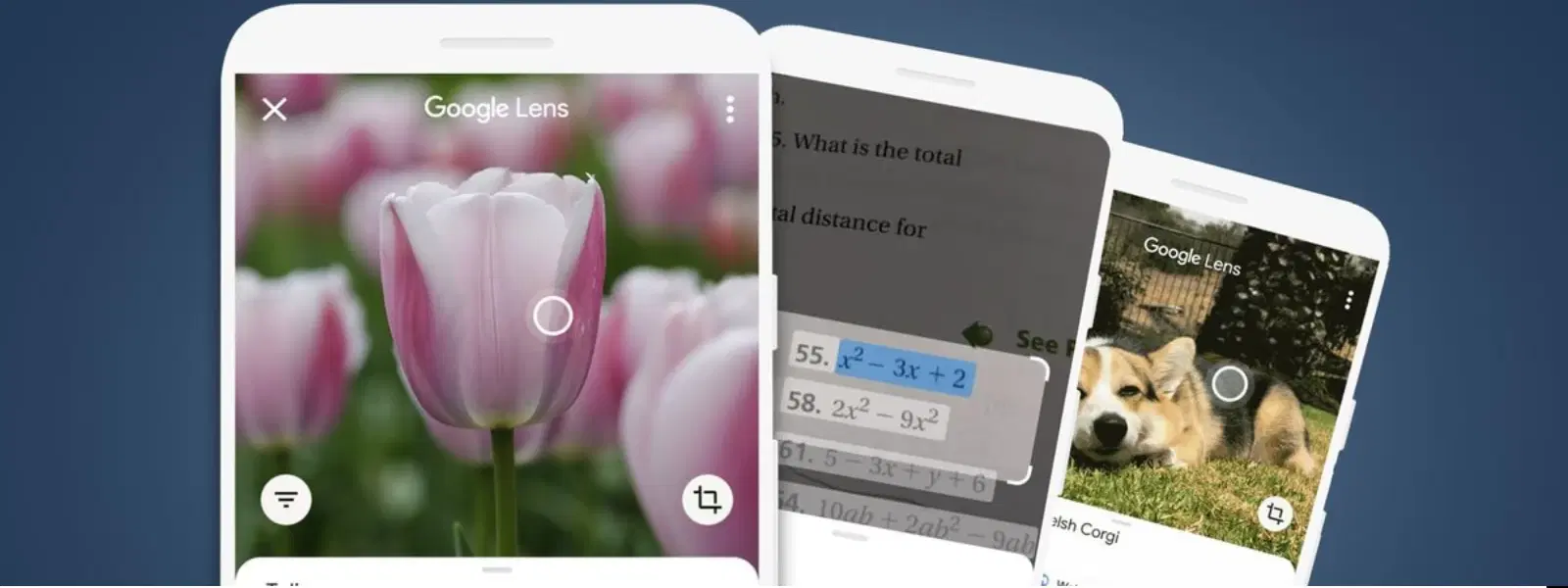
Imagine being able to identify objects, extract text, or even translate languages—all with the snap of your smartphone camera. Google Lens Camera is changing the way we interact with our world by combining cutting-edge visual search technology with AI-powered photo analysis and augmented reality enhancements. In this guide, we explore how this innovative image recognition tool works, its standout features, and answers to frequently asked questions that will help you get the most out of this exceptional tool.

What is Google Lens Camera?

Google Lens Camera is an intelligent visual search tool powered by artificial intelligence that transforms your smartphone into a powerful discovery device. It integrates an array of functionalities such as object identification, text extraction from images, and an augmented reality camera that overlays interactive elements onto your view. Whether you use it to study details of a historic monument, identify a unique plant, or simply capture a moment, Google Lens offers a seamless and smart way to connect with the world around you.

Key Features

This innovative tool is much more than a standard camera. It allows you to search using images, making it a highly effective photo-based search tool that deciphers visual clues. With its advanced camera search feature, you can quickly identify objects, landmarks, animals, and more. The text extraction from images capability enables you to copy text for editing or translation, while its augmented reality camera brings a new level of interaction to everyday scenes.

How Does Google Lens Camera Work?

Under the hood, Google Lens Camera uses a combination of AI photo analysis and machine learning algorithms to interpret what it sees. These image recognition tools work by matching visual input with a vast database of objects, places, and text to produce relevant and accurate results. This deep integration of technology ensures that whether you are hunting for an answer or exploring a new interest, your queries are met with precision.

Using Google Lens Step by Step

To start your journey with this groundbreaking image recognition tool, download the Google Lens app on your smartphone. Once installed, simply open the app and point your camera at an object of interest. Tap the screen to capture the image, and let the tool analyse and interpret what it sees. For those who appreciate an enhanced experience, the augmented reality camera option allows you to see interactive information overlaid on your surroundings. Remember to check that the device is held in optimal lighting and at the right angle for the best results.

Common Use Cases for Google Lens Camera

Lyfro Battery Powered Disinfectant Solution Generator (Disinfects Up To 99.9 %, Hydro Go, White)

Lyfro Battery Powered Disinfectant Solution Generator (Disinfects Up To 99.9 %, Hydro Go, White)

<p>The <strong>Lyfro Battery Powered Disinfectant Solution Generator</strong> is non-toxic and has no side effects</p> <ul> <li><strong>Free of Chemical Residues</strong> makes it an eco-friendly, cost-effective disinfectant</li> <li><strong>Uses Electrolysis</strong> to produce natural powerful disinfectant</li> <li><strong>300 mAh Battery</strong> with USB recharging facility</li> </ul> <p>Buy <strong>Lyfro Battery Powered Disinfectant Solution Generator</strong> to experience its awesome usages. It is an ultra-portable non-toxic disinfectant maker. It comes with an electrolysed water generator. Useful to sterilize public places as well. Use <strong>Lyfro Battery Powered Disinfectant Solution Generator</strong> which allows you to create your own non-toxic disinfectant in just 3 minutes. Simply add salt and water together. Uses electrolysis to produce natural powerful disinfectants proven to be effective against bacteria, viruses, and mold.</p> <p>When you get <strong>Lyfro Battery Powered Disinfectant Solution Generator</strong> online, you also get an awesome eco-friendly, cost-effective disinfectant for your everyday life. It is equipped with a 300 mAh battery with USB recharging facility. It is usable at home, office, or in transit. It eliminates up to 99.9 percent pathogens. It is free of chemical residues. It is a self-made disinfectant.</p>

6242999
Earn NeuCoins

Google Lens Camera adapts to your daily needs. Imagine exploring a new city and spotting an eye-catching landmark, identifying it instantly using the tool. It also comes in handy when you need to translate foreign text on a sign or menu while travelling. For everyday use, the app provides a smart solution for identifying products, making it easier to compare features and prices before making a purchase.

Specialised Applications

The benefits don’t stop at casual observation. Students can use Google Lens for AI-powered homework assistance, while hobbyists and collectors may find it invaluable as an object identification app. Professionals in design, architecture, or landscaping can rely on its ability to provide details swiftly using its smartphone visual search technology. It truly offers a wealth of applications tailored to a wide range of user needs.

Troubleshooting and Tips for Maximising Google Lens

Even the best tools can sometimes face challenges. Should you encounter blurry image recognition or unexpected search results, a few simple adjustments like ensuring good lighting or slightly changing the angle can make a significant difference. These troubleshooting tips are essential for maintaining the tool’s high performance when you need it most.

Did You Know?

Google Lens can search online directly from an image you upload, making it a versatile tool for both casual users and professionals. This smart combination of features makes it a practical partner in everyday queries and special projects alike.

For advanced users, pairing Google Lens with other applications such as Google Translate or Google Photos can offer a richer experience. Furthermore, exploring its capabilities on a PC via browser extensions or emulators means you’re never far from the convenience of this robust visual search technology.

Frequently Asked Questions (FAQs)

1. Is Google Lens free?

Juvo Personal Safety Alarm (PSB 01, Black)

Juvo Personal Safety Alarm (PSB 01, Black)

<p>Danger can overpower you at any time and your voice will not be enough in such situations to get the required aid. The amazing new <strong>Juvo PSB01 Personal Alarm</strong> is crafted for all ages and is a necessary precaution from all kinds of danger. It rings a very loud alarm at 120 dB as well as flashes the torch to warn people nearby about a danger. Whether you have a medical emergency or you are attacked by predators your voice may not be heard but this alarm will be enough to deter attackers or draw attention of people close by to give you the immediate assistance required.</p> <p><strong>Extremely Easy To Use</strong></p> <p>The <strong>Juvo PSB01 Personal Alarm</strong> is small and portable, can be attacked to even a keychain if you want. To start the siren all you need to do is separate or pull the metal key chain from the main black unit. The siren may go on for 1 1/2 hours in case nobody heard it in the first minutes. This is very important for girls returning home alone at night as it acts as a security anti-attack panic alarm that is sure to scare off a molester. Its easy portability accentuates its use.</p> <p><strong>Lights Your Way</strong></p> <p>The little and portable <strong>Juvo PSB01 Personal Alarm</strong> also features a small LED torch that helps you find your way in the dark. Don&rsquo;t be scared of dark alleys when you have this with you because it is equipped to save you from all dangers.</p>

474890
Earn NeuCoins

Yes, Google Lens is available at no cost and is accessible through its dedicated app or as an integrated feature on Android and iOS devices.

2. Can you take a picture and ask Google what it is?

Absolutely. Simply capture the image with your smartphone, and the tool will analyse the object, providing you with detailed information and relevant search results.

3. Does Google Lens work offline?

Certain features, like basic text extraction, might operate without an internet connection. However, most functionalities rely on a live connection for the best accuracy.

4. Can Google Lens translate text?

Yes, it can. Google Lens is adept at translating foreign languages directly from images or live camera feeds, making it a handy tool when travelling abroad.

5. What devices support Google Lens?

Google Lens is compatible with most Android devices and is accessible on iOS via the Google app. Additionally, it can be utilised on a PC through browser-based tools.

Google Lens Camera is a revolutionary tool that redefines how we engage with our environment through visual search technology, AI photo analysis, and augmented reality. Whether you’re looking to decipher a piece of text, identify an intriguing object, or simply explore a new perspective, this tool opens up a world of possibilities. Tata Neu continues to echo this spirit of innovation and customer-centric solutions by providing value-driven experiences and trust, ensuring that every interaction is smooth and rewarding. NeuCoins rewards and special benefits further enhance your shopping experience on Tata Neu, affirming its commitment to supporting smart, informed choices in a seamless environment.

Sangria Experience Logo