





Consumer Electronics
•04 min read

In today's digital age, our smartphones have become indispensable, storing cherished memories, essential work documents, and much more. As we continue to accumulate data, our devices often face clutter that can slow performance and lead to frustrating lags. This guide provides effective tips and tricks on how to clean phone memory, enhance your device's speed, and ensure a smoother experience every day.
Smartphone memory is divided into two primary components: RAM and internal storage. RAM supports your phone's quick access to data for smooth operations, while internal storage holds your apps, photos, and data. Maintaining a clean phone memory is essential because overloaded storage can lead to slow apps, unexpected crashes, and overall reduced performance. An optimally managed memory not only boosts phone performance but also prolongs the life of your device.
It's common to notice signs of memory overload such as sluggish performance and frequent application crashes. By understanding the basics of phone memory and recognising these signs, you can take proactive steps to manage storage effectively.
Before you jump into cleaning your phone memory, it is important to identify what is consuming space. Begin by exploring the settings of your device to check which apps and files are using the most space. Many smartphones have built-in storage monitoring features that allow you to view large files, apps, or even cached data that the system stores to speed up apps, but over time, these caches tend to clog the memory.
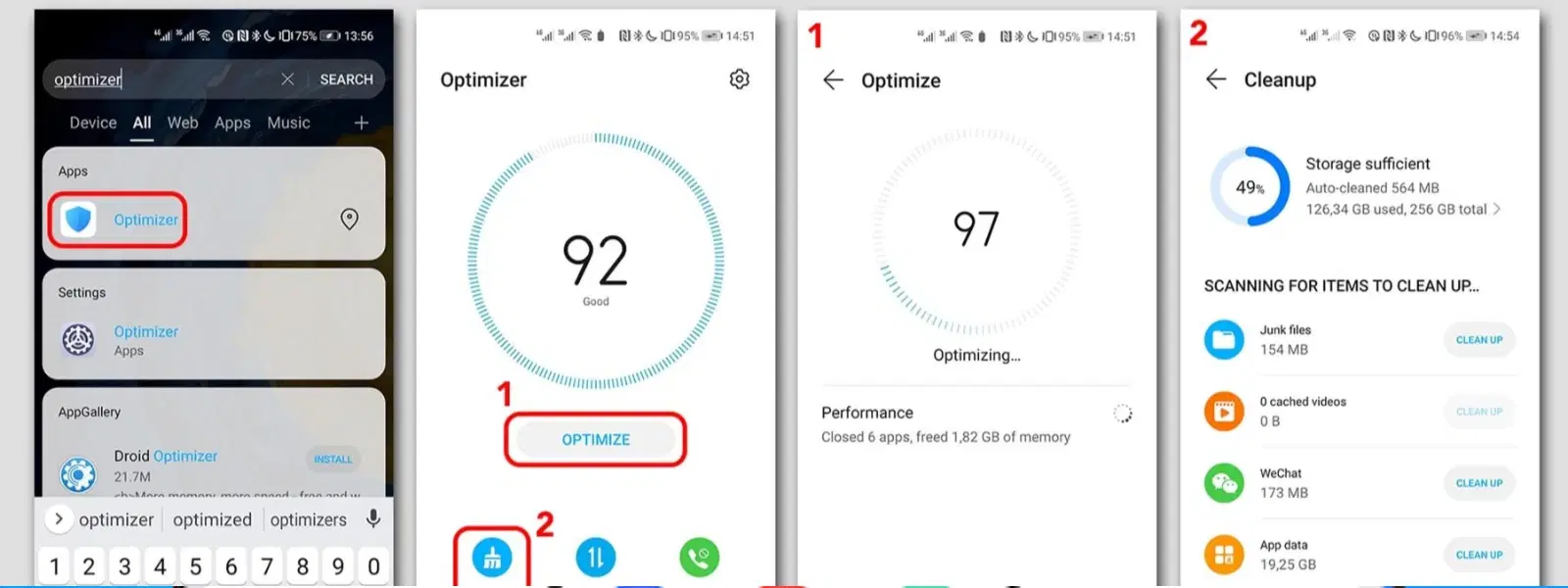
Once you've identified these storage hogs, start by removing unnecessary files. Begin with deleting old photos, videos, or documents you no longer need. Next, delete phone cache and junk files by using your device's built-in phone storage cleaner. These steps help you clear phone storage efficiently so that your phone operates more smoothly. You can also use specialised phone memory management tools available on the app store to manage your device further.
Did You Know? Regularly clearing your phone's cache can significantly improve its overall operation. Cached data might speed up temporary processes, but when it accumulates, it takes up valuable storage space, affecting performance critically.
Improving your phone's performance is not just about deleting files; it also involves optimising how data is stored and managed. Consider utilising both built-in and trusted third-party phone memory management apps that are designed to help optimize phone memory quickly and efficiently. These tools can automate the process of clearing old files and optimising background processes.
Another important strategy is to free up phone space by transferring files to cloud storage or using external storage options such as SD cards or USB drives. This not only relieves your device from storage strain but also safeguards important data. With cloud options, your data stays accessible while your device is relieved, making it easier to maintain a clean phone memory.
For users looking for more robust solutions, advanced techniques offer further control. Start by managing background processes: limit the number of auto-start apps and restrict services that run in the background unnecessarily. This reduces the clutter in your device’s memory and ensures that only the essential processes consume resources.
Regular maintenance practices also play an important role in maintaining your device over time. Keep your software updated since operating system upgrades frequently include memory management improvements and bug fixes. If your phone is persistently slow despite these efforts, performing a factory reset can give your device a fresh start while ensuring that only the data you need remains on your phone.
Using lightweight versions of apps where possible can drastically reduce the load on your phone. Lightweight apps consume less memory, enabling your device to run more efficiently. Additionally, managing app data is key. Instead of uninstalling apps altogether, you can clear app data periodically to remove redundant data without losing the app itself. This helps maintain the balance between having accessible apps and not overloading your clean phone memory.
By consistently reviewing and managing your storage, you not only ensure smoother performance but also extend the longevity of your device. This efficient approach to managing phone storage dramatically improves battery life by lessening the demand on your device’s processor and memory resources.
Clearing your phone's cache once a month is generally adequate to keep your device running optimally.
The quickest way to free up phone space is to remove unused apps, delete cached data, and transfer large files to cloud storage or external storage options.
Yes, by reducing memory strain and optimizing performance, the battery life can often improve as the device uses power more efficiently.
If your phone consistently lags, crashes, or remains slow despite other optimisations, a factory reset might be a necessary breakthrough to restore optimal performance.
Most trusted third-party apps are safe provided they have strong user reviews and come from reputable sources. Always check recent reviews before installation.
In summary, managing your device's memory through regular maintenance, timely deletion of redundant files, and strategic optimisation techniques is key to enhanced performance. The steps discussed here offer you a comprehensive blueprint for keeping your phone’s storage lean and efficient. Whether you're transferring files to cloud storage or simply removing phone junk files using built-in settings, these practices lead to a noticeable boost in your phone's performance.
By following these guidelines, you can ensure that your device not only runs smoother but also delivers a more rewarding user experience. For tech enthusiasts, young professionals, and families alike, efficient phone memory management is a step towards a more organised, streamlined digital life. Enjoy the seamless performance that comes with a well-managed device and revel in the simplicity of everyday technology. Every effort to enhance your device reliability contributes to your smart lifestyle, ensuring that when you shop or explore online services, you make the most of advanced features and special benefits like earning NeuCoins rewards, express delivery, and expert advice that make managing modern life easier and more rewarding.
