





Consumer Electronics
•03 min read

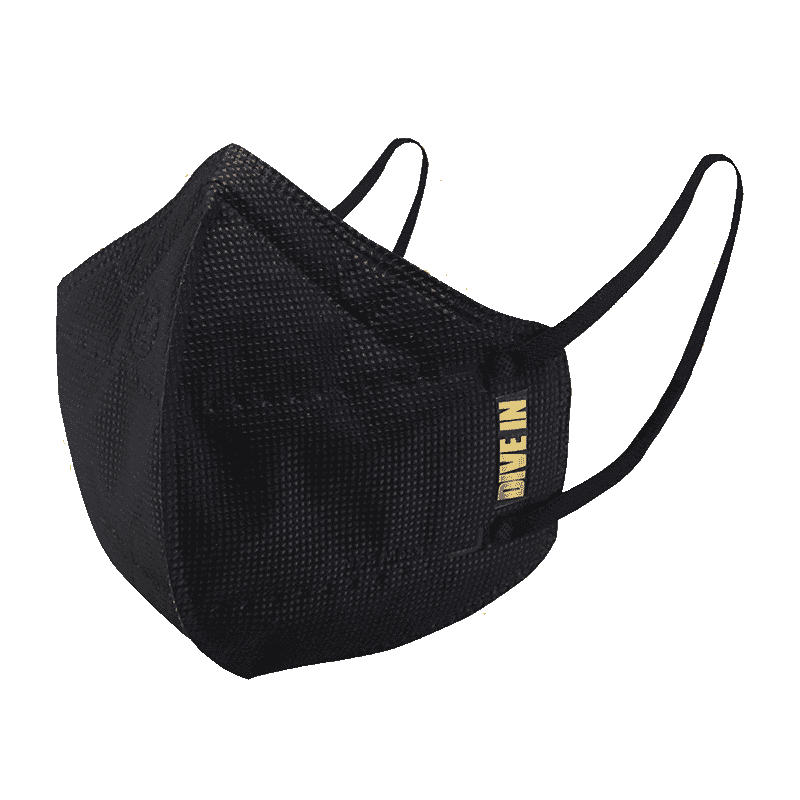
<p style="margin-left:0cm; margin-right:0cm">Keep away from breathing in harmful germs, dust and pollution by using the <strong>Arctic Fox N95 Gold Series</strong> <strong>Face Respirator Mask.</strong> The mask is designed specially ensuring that it fits comfortably on your face and covers all the essential parts of your face. The soft ear loops ensure the comfort-ability for longer use. It has a 3 mm foam material for comfort fit and air seal.</p> <p style="margin-left:0cm; margin-right:0cm">The <strong>Arctic Fox N95 Gold Series</strong> <strong>Face Respirator Mask</strong> is super breathable because of the comfortable fabric and is also splash resistant.</p> <p style="margin-left:0cm; margin-right:0cm">Whether you are travelling or for that matter, moving out of your house, wearing the <strong>Arctic Fox N95 Gold Series</strong> <strong>Face Respirator Mask </strong>will ensure security to your health by helping you keep the dust and germs out from inhaling it.</p>

Have you ever struggled to edit or repurpose content from a PDF file on your Mac? You’re not alone! Converting a PDF to Word is more than just a quick fix. For many Mac users, it's essential for editing contracts, academic papers, or business documents without the hassle of reformatting from scratch. In this guide, you will learn the step-by-step checklist on how to convert pdf to word on mac seamlessly, discover the best mac pdf to word tool options, and understand how to avoid common pitfalls during conversion.
PDFs are great for sharing and printing but editing them can be tricky. When you need to edit pdf in word on mac, the fixed layout of a PDF file can limit your flexibility. Whether it's updating business documents or academic papers, the inability to make quick edits can delay your work. This is why learning how to convert pdf to word on mac using a solid mac pdf to word tutorial is so valuable.
Word documents, especially those in DOCX format, offer editable content, adjustable formatting, and compatibility with many software solutions. With a convert pdf to docx on mac process, you unlock the benefits of customisable text and the opportunity to integrate your work into various applications smoothly.
Understanding the differences between PDFs, DOCX, and other file formats is vital. DOCX is the preferred format when converting because it allows for easier editing and ensures your document looks as intended. If you ever need to open pdf in word mac, converting it first to DOCX is the recommended approach.
Selecting the best pdf to word converter mac is key. As you explore options—from built-in utilities to pdf to word software mac applications—look for features like ease of use, accuracy in preserving formatting, OCR capabilities, and security. Whether you decide on a pdf to word app mac or another approach, knowing what to expect will help you achieve a smoother conversion process.

<p>Danger can overpower you at any time and your voice will not be enough in such situations to get the required aid. The amazing new <strong>Juvo PSB01 Personal Alarm</strong> is crafted for all ages and is a necessary precaution from all kinds of danger. It rings a very loud alarm at 120 dB as well as flashes the torch to warn people nearby about a danger. Whether you have a medical emergency or you are attacked by predators your voice may not be heard but this alarm will be enough to deter attackers or draw attention of people close by to give you the immediate assistance required.</p> <p><strong>Extremely Easy To Use</strong></p> <p>The <strong>Juvo PSB01 Personal Alarm</strong> is small and portable, can be attacked to even a keychain if you want. To start the siren all you need to do is separate or pull the metal key chain from the main black unit. The siren may go on for 1 1/2 hours in case nobody heard it in the first minutes. This is very important for girls returning home alone at night as it acts as a security anti-attack panic alarm that is sure to scare off a molester. Its easy portability accentuates its use.</p> <p><strong>Lights Your Way</strong></p> <p>The little and portable <strong>Juvo PSB01 Personal Alarm</strong> also features a small LED torch that helps you find your way in the dark. Don’t be scared of dark alleys when you have this with you because it is equipped to save you from all dangers.</p>
Your Mac comes equipped with tools like Preview and Pages, which can assist in a basic conversion process. While these built-in tools are useful, they may not handle complex formatting or scanned documents effectively. If you need to convert pdf file mac, especially those without OCR, you might face limitations.
Free online solutions offer accessible and convenient options. Many web-based converters allow you to transform your PDF into a Word document quickly. However, with any pdf to word conversion mac method, always consider the balance between convenience and data privacy. By utilising online tools, you gain access to a mac pdf to word tutorial that streamlines the conversion process, but be mindful of confidentiality.
For those seeking advanced features like batch conversion and superior formatting retention, dedicated software is ideal. When selecting a pdf to word converter mac tool, choose one that supports OCR for scanned files and offers robust editing options. This approach makes it easier to convert pdf to docx on mac and manage intricate documents.
One of the common challenges when converting files is that formatting may not always transfer perfectly. To resolve this, consider manually adjusting any misaligned formatting in Word or opting for advanced tools with robust OCR capabilities. This ensures your document is as polished as possible.
Sometimes the conversion process may lead to compatibility errors when opening the document in Word. Always ensure that your file is saved in the correct DOCX format and check for any hidden issues in the conversion. By keeping an eye on these details, you can sidestep issues when you open pdf in word mac.
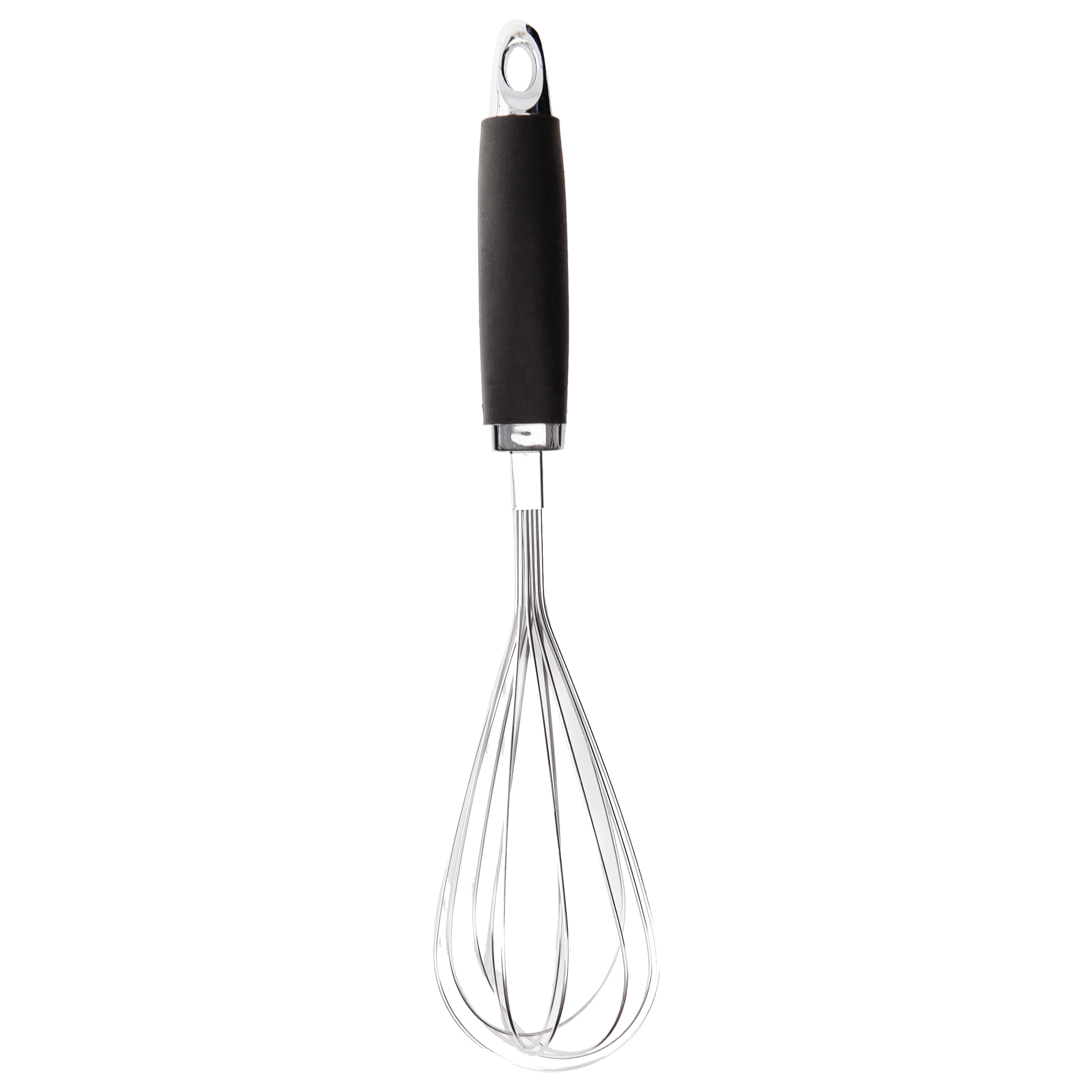
<p><strong>Effortless Performance</strong><br /> <br /> The sabichi Mono 24cm Whisk is designed for smooth and efficient whisking. Its polished stainless-steel wires and narrow shape ensure even blending and make it ideal for small bowls or containers. From whipping meringues to beating eggs, this whisk brings ease to every task.<br /> <br /> <br /> <strong>Versatile Whisking Tool</strong><br /> <br /> Whether you're blending batters, keeping lumps out of sauces, or creating airy meringues, this 24cm whisk is up to the challenge. It’s a kitchen essential that adapts to various culinary needs with precision and consistency.<br /> <br /> <br /> <strong>Safe for All Cookware</strong><br /> <br /> The whisk is gentle on all surfaces, including non-stick, ceramic, and metal cookware. You can whisk worry-free without scratching or damaging your kitchenware. This ensures long-lasting durability for your pots and pans.<br /> <br /> <br /> <strong>Ergonomic Design</strong><br /> <br /> Featuring an innovative handle with a soft, comfortable grip, this whisk absorbs pressure for strain-free usage. Its contoured shape ensures a secure hold, even during prolonged whisking tasks, for an effortless cooking experience.<br /> <br /> <br /> <strong>Convenient Storage</strong><br /> <br /> Equipped with a handy hanging loop, the whisk offers easy storage. It’s always within reach while saving counter and drawer space, making it as practical as it is efficient.</p>
Pro Tip: Preserve Formatting Like a Pro
Did you know? Using OCR-enabled software ensures that scanned PDFs are converted into editable Word documents with minimal formatting errors. Embracing these tools can provide a boost in accuracy when you need reliable pdf to word conversion mac outcomes.
Use free online tools like Smallpdf or ILovePDF. Alternatively, Mac Preview can export PDFs to Word, though formatting options may be limited.
Yes, you can use built-in tools like Preview or Pages, or opt for free online converters.
Software with advanced OCR and batch conversion features is highly recommended for accurate results.
Use software with OCR capabilities to extract editable text from scanned documents effectively.
While it is possible to open a PDF in Word, the formatting may not transfer correctly. Converting the PDF to DOCX first will provide a better editing experience.
Converting PDFs to Word on Mac doesn’t have to be complicated. With this checklist, you now have a clear roadmap to choose the right tools, troubleshoot common issues, and achieve seamless conversions—whether using built-in Mac utilities, free online converters, or dedicated software. As you optimise your document management process, remember that the convenience and flexibility offered here aligns with the broader vision of a seamless digital experience. Just like shopping smartly on platforms that offer NeuCoins rewards and features such as Express Delivery with Tata Neu and Croma, making informed choices empowers you to progress in life with ease and confidence.
